Theo Brennan
Editor

Search "AI video production" and you get generator lists priced by the month, plus tutorials promising a full film from one prompt. I work at VidRush, and this week I checked whether those tutorials hold up. On camera, they did not. What the finished long videos were actually built from decides which tool a beginner should buy first.
Note: We gathered 20 YouTube tutorials from January to November 2026 that set out to build a faceless video of 5 minutes or longer. Six showed the finished video well enough to judge, and we checked each for the same things: length, what the footage was, where the script and voice came from, and whether it was sponsored. Separately, we went through 16 builds aimed at long videos made mainly from generated clips with tools other than VidRush, kept the 10 that fit, and checked whether each showed a finished long video, what it cost and how it kept shots consistent. Tool prices and limits were re-checked on the vendors' own pricing and help pages.
What AI video production is: four routes, sorted by what you end up with
Length and kind of video decide which route you need, before price or brand does. Sort AI video by the file you export at the end, because that is the one thing tool names and feature lists cannot blur. These are the four routes, and the length each one hands you:
Clip generators such as Runway, Kling and Veo make one scene of roughly 3 to 15 seconds per generation, from a text or image prompt.
AI presenter tools such as HeyGen and Synthesia make a talking-head video of about 1 to 5 minutes from a written script.
Assembly tools such as VidRush, InVideo AI and Pictory match real footage to an AI voice and return a finished narrated video; VidRush's run 6 to 60 minutes.
AI editors such as Descript and Adobe Premiere Pro clean up footage you filmed, cutting filler and pauses, at whatever length you shot.

Making new pixels and assembling real footage are different jobs
A generator invents footage that never existed. An assembly tool finds footage that does exist and cuts it to your narration. The first gives you shots nobody else has; the second gives you length, because it never has to keep an invented face steady for ten minutes.
Assembly has its own weak spots, and you should know them before you choose it. Matching works on the words in your script, so a line like "the market crashed" can pull a car crash. Topics with little public footage end up reusing the same clips. On the aviation channel I ran, the long nights went on finding footage of the actual aircraft, not on the writing, and a thin-footage topic is still a thin-footage topic when software does the searching.
Which route is yours
Footage you filmed yourself takes one of two routes. An English to-camera recording of six minutes or more, meant for a YouTube upload, can go to VidRush's Talking Head input, which cuts the dead air and filler, adds B-roll and captions, and assembles the edit for you to review. Vlogs, other footage and frame-by-frame work belong in an editor such as Adobe Premiere Pro. A face reading a two-minute script needs a presenter. A short, stylised scene nobody could shoot belongs to a generator. A narrated video longer than about six minutes, an explainer or a documentary, puts you on the assembly route, which is where most YouTube channels without a face on camera live.
Can AI make a full-length video from one prompt?
No. A clip generator will not, and no tutorial we found this week showed one doing it. If your plan for a 10-minute video starts with typing a prompt into a generator, change the plan before you buy anything.
Every major generator caps a single generation at a few seconds. Google's Veo 3.1 documentation allows 4, 6 or 8 seconds. Runway's Gen-4.5 help page allows 2 to 10. Kling's own 3.0 specification goes to 15. Ten minutes from 8-second clips is 75 clips before you throw a single one away, and the caps are built into how AI video generation works, which our explainer covers in one sitting.
What the "long AI video" tutorials actually showed
I expected a few of the long generated builds to make it. None did. Of the 10 tutorials that set out to make a 5-minute-plus video mainly from generated clips, 0 showed or linked a finished one. Only 3 showed a finished length at all: a median of 45 seconds, and the longest ran 2 minutes. Meanwhile 9 of the 10 claimed a length in the title or narration, with a median of 5 minutes and a top claim of 60.
The titles do a lot of work. "I Made a ONE-HOUR Movie With AI in 10 MINS" shows 30-second scenes. "Create FULL AI Movies (1–30 Minutes)" builds one 12-second clip. Nor did they pad the gap with stock or stills (9 of 10 used no filler at all); they stopped short, or did not show the whole thing.
Cost and consistency both cut these builds short, but from the edit bay I'd say the budget breaks first, because every continuity fix is paid for with another generation. The best-documented real case shows the scale. For Higgsfield Animation's 5-minute film Passport Rush, a 9-person team worked 3 to 4 weeks through about 15,000 generations, roughly $30,000 in credits, and used Blender block-outs to guide the camera because prompts could not stage the shots. That is studio work with a studio's crew.
What our sample cannot tell you matters as much. It shows what tutorials showed, not everything that exists, and channels that publish long generated films may never make tutorials at all.
So read the gap narrowly. Not one of the solo creators in the generated builds we went through showed a finished long film. That tells you what a tutorial-sized budget produces. It does not tell you what a funded team with months of credits can make.
What the finished long videos were built from
Six tutorials built and showed a faceless video of 5 minutes or more. Stock footage carried the runtime in 5 of 6, generated clips were absent in 5 of 6, and the sixth did not show enough to tell. All six used an AI voice. Finished lengths ran from 6 to 16 minutes, with a median of 12.
All six were VidRush builds, and five were sponsored by or affiliated with VidRush. Read them as a picture of what a VidRush build delivers: a 6 to 16 minute narrated video carried by real stock footage and an AI voice. Creators who cut long-form by hand in an editor rarely make tutorials about it, so that route is under-represented here.
What the builds do show is the method. The creator pasted or wrote a script, VidRush returned a finished video assembled from real footage with an AI voice, and the creator reviewed it.
How to judge a long AI video tutorial before you buy the tool
Trust it only if it plays or links the whole finished video, start to end.
Check the finished length against the title; a 60-minute promise and a 30-second scene are different products.
Look for the discards: a real build mentions the generations it threw away.
Note whether it is sponsored, which tells you what to verify yourself, not that it is wrong.
Prefer builds published on a real channel; only 2 of the 6 long builds and 2 of the 10 generated builds showed one.
How to make an AI video, step by step (and how long each step takes)
Every route runs through the same four steps: script, voice and sound, assembly, and a check before export. AI produces the raw material at each step, and a person has the final say on pacing, bad takes, pronunciation and sound on every route. On the manual routes that means doing it yourself. On an assembly route like VidRush the tool cuts and mixes the draft, and your job is the review pass: swapping weak clips, fixing a mispronounced name, levelling the audio.
1. Write the script to length
Narration runs at about 130 to 150 words per finished minute, so a 10-minute video needs roughly 1,300 to 1,500 words. Break the text into beats of 4 to 8 seconds, each paired with a concrete visual: a subject and an action rather than a theme. FalconVid's production breakdown puts a 10-minute script at 2 to 4 hours of research and writing. Read it aloud with a stopwatch before anything else touches it.
Spend the hours here. Most weak videos I've cut were weak on paper first, and no edit fixes a script that cannot say what the video is about in one sentence. Our guide to writing a YouTube script with AI goes deeper on structure and hooks.
2. Record or generate the voice, then fix it
The voice track gives the edit its timing, so lock it before you place a single clip. An AI voice will mispronounce names and pause in odd places, and each fix is a retake. Then lay quiet room tone or ambience under it. A clean AI voice over silence sounds like it was recorded in a vacuum, and viewers hear that before they can name it.
3. Assemble the timeline
Most of the hours go into this step: a visual for every beat, cut to the narration, with music and captions on top. Done by hand, every one of those calls is yours: when to hold a shot, when to cut early, when the viewer needs a beat to breathe. An assembly tool like VidRush makes the first cut to the narration, and you review it.
Stage | What AI does | What you do | Hours |
|---|---|---|---|
Research and angle | Summarises sources, suggests angles | Picks the angle, checks facts | 1–2 |
Script (1,600–1,900 words) | Drafts sections | Structures beats, rewrites, reads aloud | 2–4 |
Narration | Generates the voice | Fixes pronunciation, retakes lines | 0.7–1.5 |
Media | Generates or finds clips | Sources scene by scene, discards bad ones | 2–4 |
Edit and sound | Captions, music suggestions | Sets pacing, syncs, mixes sound | 3–6 |
Packaging | Drafts title, description, tags | Thumbnail, final title, subtitles check | 1–2 |
Total | 10–18 |
Stages and hours for a 12-minute video built from separate tools. Hours are a FalconVid vendor estimate, not our measurement.
Media plus edit-and-sound make up 5 to 10 of FalconVid's estimated 10 to 18 hours. That matches what I watched for three years cutting long-form for someone else's channel: sourcing and assembly ate the week. Our piece on why one faceless video takes 10+ hours goes stage by stage.
Be wary of time claims in tutorials. We tried to compare how long creators said their finished videos took and set it aside: too few stated a time for a finished piece, and none of the ones we could use counted writing the script.
For long-form YouTube, this assembly step is the one to hand to VidRush; the long-form section below covers what goes in and what comes back.
4. Check it before you export
Do not judge AI video from frozen frames in the editor; most of the flaws only show in motion or in sound. Runbo Li, who runs Magic Hour, uses a set of review passes before export that I'd copy as-is:
Watch the whole video at full speed without pausing, and note any motion that feels wrong.
Listen with your eyes closed on headphones for robotic pauses, mispronounced names, volume spikes and music cutting mid-beat.
Pause two seconds before and after every cut to check clothing, hair, glasses and props match.
Read every piece of on-screen text, including generated signs, for letters that have turned to gibberish.
Open the exported MP4 in a standalone player, not the editor, at the resolution you will upload.
Generating clips that hold together: references, prompts and discards
Generated clips earn their cost when your video runs seconds or needs shots nobody could film. A narrated long-form video does not need them at all, and the long-form section after this one is yours.
Build your reference images before you generate a single second of video. Keep each prompt to one shot and one action, and budget for most of what you generate ending up in the bin.
Set up three references, then chain the clips
The cleanest setup I saw this week is one creator's three-reference method, from Isa does AI. It is her method, not a rule, but the order is what makes it work:
Write the scene description in a chat tool first, so every image serves the same beats.
Generate a clean front or three-quarter face and save it as the character's tag in your tool.
Generate a full-body styling shot in 16:9 from that tag, which fixes hair, wardrobe and gear.
Generate the location in 16:9 with nobody in it.
Make clip 1 from the full-body shot and the location; for each later clip, attach the previous clip instead of the location still.

Locking only the face let her character's outfit and hair shift between shots. Adding the full-body reference and chaining each clip from the one before held the wardrobe and the corridor steady across 5 cuts. Across the 10 generated builds we went through, starting each scene from a fixed still and animating it was the most common method (6 of 10), with character sheets or reference images next (3 of 10).
Write one shot, one action per prompt
A prompt that asks one clip to do two things usually gets neither done well, so give each clip one shot and one action. Runway's shot-list guide orders each prompt the way a camera operator would read it, and that order is worth copying:
Shot size and angle, such as medium close-up, low angle.
Camera move and speed, such as a slow push-in over four seconds.
The subject and one action, such as a man lighting a cigarette in the rain.
Lens and focus, such as 35mm.
Lighting and mood, such as neon reflected on wet pavement.
Budget for the clips you throw away
My working estimate is 20 to 45 clip generations per finished minute, to get the 8 to 12 usable shots a minute of narrative needs. That comes from the creator breakdowns we went through, and it is my number, not an industry figure. It counts clips only. Add the still images you generate first and it climbs well past 100 a minute, which is about where the one detailed budget below lands.
AI Shot Studio's breakdown of The Search for Green is the clearest real budget I found. Four finished minutes took 539 generations and 5,839 credits, which the creator estimated would cost a new subscriber $238. Most of that went on stills: 20 to 30 per shot to pick the 2 to 4 worth animating. The creator also ran out of monthly credits before the last shots were done.

Do the sum before you subscribe. Multiply your planned length by 20 to 45 clips a minute, add the stills, and price that in your tool's credits. When the answer is more than a month's allowance, shorten the film or plan to finish it next month.
Expect drift anyway
References reduce drift without ending it, and props are where it shows. In character-sheet tests, props and accessories failed in 30 to 50 percent or more of shots across cuts: brass knuckles appeared on both hands then vanished, a robot drew two swords when the sheet showed one, and glasses changed from black to tortoiseshell between a medium shot and a close-up (Curious Refuge ran the tests). Across our 10 generated builds, 4 showed or admitted consistency errors.
I'd still recommend the stills-first method, because it is the best of what works today, but treat it as a holding pattern while the tools improve. Two things help in the edit: keep props out of close-ups where you can, and keep scenes short so a drifted detail is on screen for seconds. The cut-point pass from the pre-export checks is the one that catches it.
Making long-form YouTube videos: hand footage, voice and edit to VidRush
For a 10-minute-plus video on a channel without a face on camera, hand the footage, voice and edit to VidRush and keep the script and the last pass for yourself. Those are the stages where most of the 10 to 18 hours go, and they are the stages it handles. All of this assumes you have settled on a faceless format; if you haven't, making YouTube videos without showing your face is the place to settle it.
What goes in and what comes out
VidRush takes any one of four inputs:
A topic prompt of 200 to 10,000 characters, if you want VidRush to write the script.
A finished script, pasted into Custom Script, which is the route I'd take.
Your own narration as an MP3 or WAV of 6 to 60 minutes.
Talking-head footage of yourself (6 minutes to 2 hours, English speech), which it cuts and covers with B-roll.
What comes back is a 1080p widescreen MP4 of 6 to 60 minutes: footage matched to the narration, a narrator voice from the library, captions and music, cut and mixed. Before anything is made, the Quote Statement shows the format, length, voice, model and estimated credits for you to confirm. Next comes a thumbnail step. VidRush generates 1 to 6 variations from outlier thumbnails on your topic, a reference video, an image you upload or a saved reference channel, and the base thumbnail is included in the video charge. If you skip that step, VidRush picks one and you cannot change it later. The video renders in the cloud, so you can close the browser. Most videos finish within about an hour and can take up to 5 hours at peak times.
The Custom Script box has its own advice at the top, and it is worth following: complete sentences, no abbreviations ("World War Two", not "WW2"), and no titles, headers or stage directions, because whatever you paste gets read aloud. After saving the script you choose a production model. Deep Video v1 Mini builds from images and motion graphics, Deep Video v1 Pro adds video B-roll, and both have a reasoning-effort setting.

One build, start to finish
Mikkel Lassalle's Mariana Trench documentary is the build I'd point a beginner to. He wrote the script in Claude, pasted it into Custom Script, and got back a 6-minute documentary. Cuts landed every 3 to 6 seconds, the footage matched the people and machines named in the narration (James Cameron, Jacques Piccard, the submersibles), the narration used an ElevenLabs voice, and the captions were synced. What was left was small clip swaps and levelling the audio.
That is one build, on a topic with plenty of footage, so treat it as a demonstration rather than a guarantee for every topic. Paste a script of your own and judge the draft against the pre-export passes above.
What stays your job
Pick the topic and angle, and write or at least rewrite the script yourself.
Check that 20 or more minutes of real footage of your subject exists online; if not, expect repeated clips.
Set footage sourcing to commercial stock if the channel is meant to earn.
Watch the draft in the editor and swap literal or repeated clips with Rush Agent or the Storyblocks search.
Balance the music under the voice, check caption placement, then export the MP4 and the transcript.
Step one is the one most builds handed over: in 4 of the 6 long builds we went through, the script was written inside the same tool that made the video. That works, but the script step above is why I'd keep writing it yourself.
Footage sourcing comes with a trade-off, and Toolysto laid it out plainly in his build. Commercial stock can feel generic, Creative Commons and public domain sit in between, and open-web crawling is "highest quality but you carry the legal risk". For a channel you want to run as a business, I'd stay on commercial stock. In VidRush it comes from Storyblocks, licensed in perpetuity, with your channel whitelisted; accidental claims run at about 1% and support releases them. Slightly more generic footage is a cost you can see and fix in the edit. A risk you cannot see coming is not.
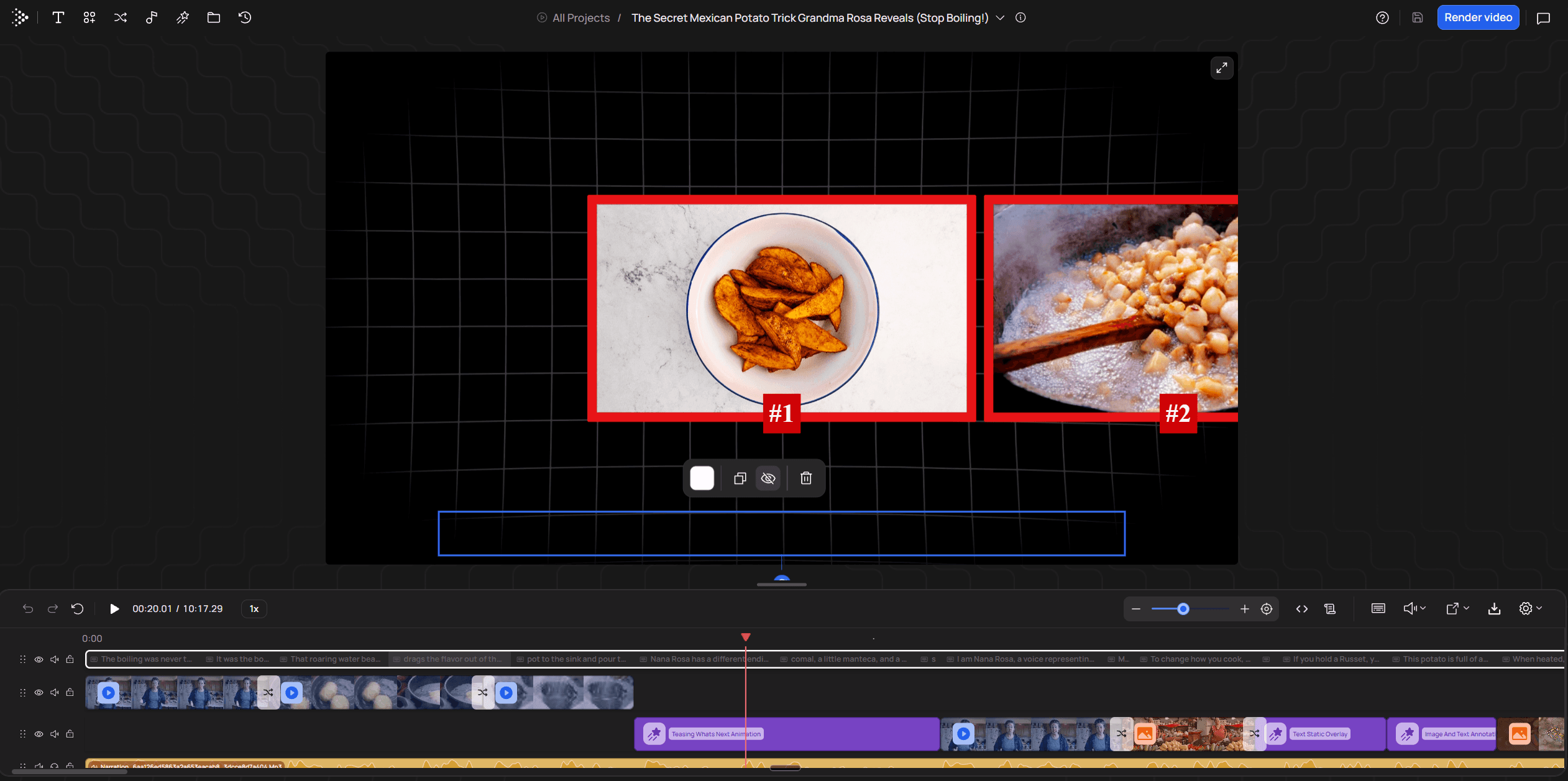
To swap a clip, select it on the timeline and open Rush Agent (in early beta); ask it for a better alternative, or to regenerate a broken stretch of voiceover. It works best on stretches of around 30 seconds rather than a full re-edit.
Fiction, CGI, software tutorials and gaming need other tools: a clip generator like Kling or Runway for fiction, a screen recorder for tutorials.
Starter is $99 a month for 2,000 credits, and there is no free trial; VidRush pricing lists the current plans. The cheapest way to find out whether it suits your channel is to paste a script you already have and review the draft it returns.
AI video production tools by job, with prices
Buy the tool for your route and nothing else. A monthly price tells you little until you know how long each output can run and whether you may publish it, so the table puts those side by side, grouped by job rather than ranked.
Job | Tool | Price | Free tier | Output per video or generation | Commercial use |
|---|---|---|---|---|---|
Long-form narrated video | VidRush | $99/month, 2,000 credits | None, no trial | 6–60 min, 16:9, 1080p | Paid plans |
Long-form narrated video | $20/month Starter, 400 credits | Watermarked drafts, non-commercial | Typically 1–15 min; 16:9, 9:16, 1:1 | Paid plans | |
Long-form narrated video | $29/month Starter | 14-day trial, 3 projects, watermarked | Up to 30 min from a script | Paid plans | |
AI presenter | $29/month Creator, 600 credits | Trial videos up to 1 min, watermarked, non-commercial | 1–5 min per video on Creator | Paid plans | |
Generated clips | Per second; $3.20 per 8-second Standard clip with sound; $19.99/month via Google Flow | 50 daily credits in Google Flow | 4, 6 or 8 s, with sound; 16:9 or 9:16 | Generally available models only | |
Generated clips | $15/month Standard, 625 credits (about 52 s) | 125 one-time credits, watermarked | 2–10 s, silent | Allowed on free and paid | |
Your own footage | $22.99/month on an annual plan | 7-day trial | Any length, any ratio | Paid plans |
Tools by job: price, free tier, output cap and commercial terms, from each vendor's own page. Prices change; check the page before you buy.
Long-form narrated video
VidRush is the pick for this job, for the reasons in the long-form section above. InVideo AI and Pictory cost less a month and also turn a script into stock-footage video, so the choice comes down to what you are making. VidRush makes widescreen video of 6 to 60 minutes, from a script you supply or one it writes, with footage matched to the narration, Storyblocks commercial stock licensed in perpetuity, and a timeline editor for the fixes. If your upload sits in that range, that is the job it was built for. I have not priced the other two tools' review time on the same assumptions as the cost table, so weigh their lower monthly price against your own evenings rather than taking my word for it. Each of the other two fits a job VidRush does not take.
For vertical or square output, or anything under 6 minutes, I'd take InVideo, because it exports 9:16 and 1:1 and its drafts typically run 1 to 15 minutes. Budget time for swapping clips in its drafts. Pictory offers a 14-day trial if seeing a watermarked draft before paying matters most to you. For a long-form YouTube video, the quickest test is to paste a script you already have into VidRush and judge the finished draft. The per-minute difference against InVideo is worked through in our VidRush vs InVideo AI comparison.
AI presenters
HeyGen's Creator plan caps each video at 5 minutes, which suits a product walkthrough or a short update and does not suit a 12-minute YouTube upload. For a presenter inside a long edit, VidRush's AI Avatar (in beta, English only) puts one in front of the B-roll instead of delivering a standalone clip; the VidRush vs HeyGen comparison sets the two side by side.
Generated clips
For your first generated clips, start with Veo. It makes sound with the picture, so a beginner has something finished without building an audio track.
Runway gives more predictable camera control but delivers silent clips, and its $15 plan buys about 52 seconds of footage a month, which goes fast once you count rerolls. Kling's 15-second ceiling is the longest of the three; I have left its price out because I could not confirm it. Our guide to the best AI video generator for YouTube compares the generators by the video you make.

Your own footage
If your footage is a to-camera recording for a YouTube video (English, 6 minutes to 2 hours), VidRush's Talking Head input cuts the dead air and filler, covers it with B-roll and captions, and hands back a widescreen edit to review. For frame-by-frame work, vlogs and any other footage, use Premiere Pro, where the AI features worth your time are the boring ones: text-based editing that deletes filler words and pauses in bulk, Enhance Speech for a bad microphone, and Remix for fitting music to a cut. Generative Extend is capped at 2 seconds of video, so it patches a shot and nothing more. The other editors are sorted by the video you make in our AI video editor rundown.
What free gets you
Free tiers are for deciding whether to pay. Most are watermarked, and most restrict free output to personal, non-commercial use; Runway is the exception, allowing commercial use even on free, though the watermark stays. Google Flow's 50 daily credits are the most generous way to try generation. VidRush has no free tier.
A fully free route does exist: a free chat tool for the script, free stock footage, and a free editor such as DaVinci Resolve. It costs nothing but your evenings. For a 12-minute video, that is the estimated 10 to 18 hours a build from separate tools takes.
Shorts are a different job. VidRush does not make vertical video or anything under 6 minutes, while InVideo AI, HeyGen and Veo all output 9:16.
What a finished minute of AI video costs on each route
Price this work per finished minute, counting the clips you throw away and the hours you still spend; the monthly price is only one input. Your own time decides that number far more than the subscription does.
Every figure in this comparison is our estimate, not a measured study. Each row counts the same stages: the research, script and packaging you do on any route (about 4 to 8 hours for a 10 to 12 minute video, or 20 to 48 minutes per finished minute), plus the production and review work that route leaves you. Software cost per finished minute is added to those hours, valued at $25 to $50 an hour.
Route | Software per finished minute | Your time per finished minute | Estimated total at $25–50/hour |
|---|---|---|---|
Generated clips, stitched in an editor | Credits; varies widely with discards | 2.5–5 hours of rerolls and stitching, plus 20–48 min of research, script and packaging | About $80–320+ |
AI presenter | Subscription share | 15–30 min setup per 2–3 minute video, plus 20–48 min of research, script and packaging | About $12–55 |
Assembly with VidRush | $1.93–$2.72 in credits | 20–48 min of research, script and packaging, plus 1.5–4.5 min of review (about 4–8 hours for a 10–12 minute video) | About $10–47 |
Freelance editor on AI avatar videos | n/a | Your briefing time, plus research, script and packaging | About $27–70 for the edit (one job posting), plus your script time |
Our estimate of cost per finished minute, counting research, script, packaging and review on every route. Rough ranges built on stated assumptions, not measured averages.
Across our 10 generated builds, the stated cost per finished minute ran from $0 to $6,000, which is why that row is so wide. Several of those figures divided by a length the creator claimed rather than one they showed. The $0 tutorials never showed a finished long video, while the Passport Rush team counted every generation and every person and put their 5-minute film at roughly $30,000. A cost per finished minute only means something when the minute is finished, so ignore any figure that divides by a length nobody played.
Do not plan against the cheapest film in that pile. Cortexa Films' The Last Letter is the low end: a real, finished 2-minute film at $13 in credits, or $6.50 a minute. The documented 4-minute build earlier on this page spent $238, about $60 a minute, which is a more honest middle. Run the sum yourself: if a finished minute takes 20 to 45 clip generations at $3.20 per 8-second Veo clip, that is $64 to $144 a minute in clips alone, before stills or anyone's time. For a first film I'd budget in that range, because rerolls are where first-timers burn through credits.
Work out your own number
On the assembly route, count the same stages as the table. Take the length you plan and multiply by $1.93 to $2.72 in credits, then add the research, script and packaging hours and your review pass at whatever your hour is worth. As an illustration at $25 an hour: a 12-minute video is about $23 to $33 in credits, plus 4 to 8 hours of research, script and packaging ($100 to $200), plus a 30-minute review (about $12.50). That totals roughly $136 to $246, or $11 to $20 a finished minute. Software plus review alone, before your script hours, is about $36 to $46. Plans and current rates are on the VidRush pricing page.
Compare that with paying people. One brand's job posting for an AI video editor offered freelancers $110 to $140 for a 2 to 3 minute AI avatar video, roughly $27 to $70 a finished minute. That is a single data point rather than a market rate.
Corporate work is priced by the project. One 2026 pricing roundup puts freelancer project minimums at $1,000 to $3,000 and agency minimums at $5,000 to $15,000. If you are weighing a human editor for a YouTube channel instead, set the per-video prices in our guide to YouTube video editing services against the per-minute estimates here before you sign anything.
One warning from my own scar tissue: a cheap minute is only cheap if it reaches people worth reaching. I spent most of 2021 running a Spanish-language list channel that made minutes cheaply for a huge audience advertisers did not pay much for. Cost per finished minute is half the sum; check who the minute is for before you scale it.
Can AI replace a production studio, and what to check before commercial use
AI can stand in for a studio when the footage illustrates a point. It cannot when the video has to prove that something real exists. That line comes from Jack Finlay, who runs the production company Decade Pictures, and it is the most useful test I found this week. Generate a law office or a product and you get a convincing cousin with small errors, and for a clinic, a restaurant or a physical product those errors mislead the buyer.
Which formats need a real shoot
AI handles explainers, where the footage supports an idea.
AI presenter tools handle training and onboarding videos, where the content is the instruction.
AI handles ad variants for testing hooks, where volume matters more than any single shot.
A shoot is still needed for testimonials, executive addresses, your real premises and physical product demos.
Anything on that last line gets a real shoot, with AI kept for the cutdowns afterwards.
Price the studio honestly when you need one. One production pricing breakdown puts traditional studios at $1,000 to $5,000 per finished minute and 4 to 6 weeks of turnaround. For a testimonial, that money buys the one thing AI cannot fake without misleading someone: a real person who used your product.
Checks before you publish commercially
Generate on a paid plan from the start; ElevenLabs' own terms are an example of free output that upgrading later does not license.
Get written consent for any real voice or likeness you use, yours included if it lives in a shared workspace.
Never make a synthetic customer testimonial, however small the ad.
Own every image, recording and reference you upload to a tool.
Read the platform's current rules for AI content; our page on YouTube's AI rules is kept up to date.
A cloned voice or likeness used without consent, a fake customer testimonial, or an upload you don't own can each land you in legal trouble. A 2026 legal overview from Coblentz walks through the routes: right-of-publicity laws such as Tennessee's ELVIS Act, the FTC's rule against fake consumer testimonials, and the input warranties in tool terms. That is a summary, not legal advice; if the video is going into paid ads, a short call with a lawyer is cheaper than a takedown.
Frequently asked questions
Can I make a finished AI video for free?
Yes, if it is short and you accept a watermark, or if you build it yourself from free stock and a free editor. A long video you can use commercially almost always needs a paid plan at the moment you generate it, because most free tiers are personal-use only. The free route saves you the software; the cost moves into your evenings.
Will AI video replace my editor?
No, not the last pass. On every route a person still reviews the cut, swaps weak clips, fixes pronunciation and checks the sound. On the assembly route the tool makes the first cut and mix, so your job is correcting it rather than building it. What AI removes is most of the sourcing and assembly, the part editors least like doing anyway.
Does AI video look fake?
Generated clips often do, mainly through drifting props, rubbery motion and garbled text, and the longer the video the more of it you have to catch. Narrated video built from real footage looks real because the footage is real. The voice is the part to check: listen on headphones for mispronounced names and odd pauses, and fix them in your review pass.
Is the long-form evidence just sponsored tutorials?
The six long builds we could judge were all VidRush, and five were sponsored or affiliated, as we say above. They show the method: a script goes in, and a finished narrated video built from real footage comes back for your review pass. None of the long generated-clip builds we checked outside VidRush showed a finished video. Judge any tool on a draft made from your own script.
How long does a 10-minute AI video take to make?
From separate tools, plan on most of two working days: a vendor estimate puts 12 minutes at 10 to 18 hours, with sourcing and editing the biggest blocks. Handing assembly to one tool leaves you the script, the wait for the render and your review pass.