Theo Brennan
Editor

The right YouTube video editing service is the one that costs least per finished video at the number you actually upload, and the monthly price barely tells you that. What sets the real cost is how many videos a service works on at once, how many days a draft takes, and whether revisions use up your allowance. On the 13 services we read, those lines sat on the pricing page itself, under the plan cards or in an FAQ on the same URL, where most buyers have already stopped reading.
If your channel is narration-led (documentaries, explainers, list videos), start with VidRush. I work at VidRush. It is software that turns a script or your own narration into a finished long-form edit for roughly $22 to $25 a video on the entry plan. If you film yourself alone, test it on one real recording before you drop a human editor, because nobody we found has shown that upload working publicly on their own footage. Tutorials, gaming, vlogs and Shorts are out.
Everyone else decides on how often they upload. Once or twice a month, hire a freelancer per video and skip the subscription entirely. Around four a month it gets interesting: compare Vidchops ($495 for four) with Replayed, Tasty Edits and the 'unlimited' teams, most of which work on one video at a time.
Note: How we researched this. We read the pricing page, FAQ and terms of 13 services that sell human long-form editing and publish prices on their own site, and answered the same questions for each. We also went through 9 public demos, 8 of VidRush and 1 of a comparable AI tool, to see what goes in and what comes out. Prices, terms and turnarounds are as the providers' own pages stated them at the time of writing, and turnarounds are their claims, not deliveries we timed. Recheck before you buy.
The YouTube editing services worth shortlisting, and the catch in each
Seven options make a realistic shortlist for a solo creator on a modest budget, across four kinds of provider: software, subscription teams, per-video agencies and marketplace freelancers. Each has a headline price and one line in its fine print that changes what that price buys. Find that line before you pay. Otherwise you find it when the second video comes back late.
Price, what you get and the catch, side by side
Option | Entry price and billing | What's included | Suits | The catch to check |
|---|---|---|---|---|
VidRush (software) | $99/month Starter, about 45 finished minutes; no free tier | Finished 1080p horizontal edit of 6 to 60 minutes: dead air cut, B-roll and motion graphics laid in, captions styled; you finish it in a browser timeline | Narration-led documentaries, explainers and list videos; solo to-camera explainers in English | Refuses tutorials, gaming, vlogs, reactions, multi-speaker recordings and Shorts |
Vidchops | $495/month for 4 credits, month to month | One credit is one finished long-form video; 1 to 2 business day turnaround; dedicated editor; 3 revisions per video | Weekly creators whose videos finish under 15 minutes | Finished videos capped at 15 minutes; no voiceover; long-form subtitles cost $95/month extra |
VidPros | $1,000/month Starter, month to month | '5–10 long-form' up to 15 finished minutes; dedicated editor with a backup; 1 to 3 business days | One or two polished talking-head videos a week | Each revision round counts toward the monthly output |
beCreatives | $1,199/month, or $999/month billed quarterly | 'Unlimited' edits; long-form under 20 minutes in up to 3 business days; 50GB raw footage per order; Slack access | Heavy short-form with occasional long-form | One active request at a time |
Replayed | $195 to $349 per video for 16 to 35 raw minutes; $249 to $559 for 36 to 60 | Licensed music, stock, audio work, colour grading, project files on request; 1 hour of free revisions | Irregular or twice-a-month uploaders | Revisions past the first hour bill at $35 to $49/hour; thumbnails $89, vertical reformats $59 |
Tasty Edits | $327 per video, or $305 each in a 4-pack | 48-hour first drafts advertised; motion graphics; unlimited revisions; dedicated editor and manager | Creators who batch-record and want fast drafts | Thumbnails and vertical reformats cost $43 each on top |
Upwork or Fiverr freelancer | About $100 to $300 per standard 8 to 15 minute edit | Whatever you agree in writing | Custom formats (gaming, vlogs, multi-cam) or irregular schedules | No backup if they vanish; cheap gigs often surcharge revisions, high-res renders and source files |
Seven YouTube editing options: entry price, what's included, who each suits and the catch to check. Recheck prices before buying.
The human prices come from each provider's own pricing page: Vidchops, beCreatives, Replayed and Tasty Edits. The freelancer row is my own conversion, not a quoted price. Upwork's rate guide puts a mid-tier editor's hourly median around $40. In my years cutting, an 8 to 15 minute talking-head edit has taken three to six hours, which is $120 to $240 at that rate. B-roll sourcing or a fast turnaround pushes it toward $300, and a clean single-take recording can come in nearer $100. The $150 in the table is where I'd expect a simple edit to land, so treat it as an estimate and ask for a real quote on one of your own videos.
Narration-led and solo-explainer channels should price the first row alongside the software section below, which covers what goes in, what comes back and how to test it. Gaming, tutorial, vlog, reaction, podcast and Shorts channels can skip that row, because those formats are refused at upload. If you film yourself alone in English, the talking-head upload cuts dead air and filler, lays in B-roll and captions, and returns a finished edit at about 90% of the recording's length. The software section shows how to test it on one recording.
Which catch decides it for your channel
For videos that run 18 to 20 minutes, the 15-minute cap at Vidchops and VidPros is the line that rules them out. I would not plan on negotiating it. A length cap written into the definition of a credit is how the service prices an editor's day, so going over usually means a surcharge or a custom quote.
The freelancer's catch is the one the price hides best. When a single editor gets sick, takes a bigger client or goes quiet, nothing gets edited until you find another one. That risk is worth carrying at one or two videos a month. At weekly uploads it is a planning problem you will hit eventually.
Shorts and thumbnails cost extra almost everywhere
Replayed charges $89 per thumbnail and $59 per vertical reformat.
Tasty Edits charges $43 each for thumbnails and vertical reformats.
Vidchops lets one long-form credit become four Shorts, so Shorts come out of the same four credits.
VidRush outputs horizontal only and does not cut Shorts from a long recording.
If Shorts are the main job, a dedicated clipping tool is a separate purchase and a separate decision. Leave the add-ons alone until the long-form edits arrive on time. Paying $43 to $89 a Short on top of an edit you have not judged yet just buys a second thing to be disappointed by.
What a YouTube editing service really costs per video at your upload cadence
At four uploads a month, a long-form edit from the human services on this list costs about $124 to $349 a video. Upload less and the per-video price of a subscription climbs fast. A monthly fee only becomes a per-video price once you know how many videos the plan can finish, and that number comes from the throughput terms, not the plan card.
Why 'unlimited' rarely means more videos
I expected the 'unlimited' plans to work on one video at a time with slow long-form drafts, and that part held. Of the 5 unlimited plans among the 13 services, 3 state one request at a time, 4 quote 3 to 5 business days for a 10 to 20 minute first draft, and only 1 states how fast revisions come back. They typically name no monthly long-form count at all.
Across all 13, only 2 let two requests run at once at the entry tier. One of those offers two active requests, but its own FAQ says the team gives your account 2 to 2.5 hours each business day. Two slots sharing the same hours do not double your output.
Do the arithmetic on a one-at-a-time queue. A month has about 20 business days. A 3-day draft plus a day for your notes and the fix is 4 days a video, which fits about five in a month, and with no revisions at all you might fit six.
So on their own stated terms, a single queue tops out around four to six long-form videos a month, however 'unlimited' the plan is. That ceiling is on paper. We looked for creators' own counts of what they actually received and could not find enough usable ones to check it.
Between a plan that says four and a plan that says unlimited, I'd schedule around the one that says four. A stated count tells you when the month runs out before it happens. A one-at-a-time queue, like beCreatives', tells you only when a draft lands a day late and your upload slips with it.
When you shop, drop the word 'unlimited' and ask two things: how many of my videos can be in progress at once, and how many business days does a long-form draft take. Those two answers tell you what your month looks like.
Revisions and length caps shrink the count further
The clearest example is VidPros. Its Starter plan is $1,000 a month and promises '5–10 long-form' videos. That figure has an asterisk, and the footnote says revisions are unlimited but each round counts toward your monthly output. 'Long-form' there means up to 15 finished minutes cut from up to 60 minutes of raw footage, and the page says complex edits land at the low end.
VidPros is one of three services among the 13 that count revisions against your allowance. The other two sell editor hours rather than videos. On those, revision time simply comes out of the same hours as the edit.
In my years in edit bays, the first two or three videos with a new editor nearly always needed an extra round while they learned the client's pacing and what to cut. On a revision-counting plan, those are exactly the videos that drain the month.
So plan on the low end of any range. For a weekly uploader on VidPros that settles the price: $1,000 for the four videos you need, $250 each, and the ten-video month that makes the plan look cheap never arrives. Length squeezes the count too. On top of the 15-minute finished caps at Vidchops and VidPros, a third plan in our sample caps the raw footage at 15 minutes per long video.
Cost per finished video at 1–2, 4 and 12 uploads a month
Option | 1–2 a month | 4 a month | 12 a month |
|---|---|---|---|
VidRush (software, 10-minute videos) | $49.50 to $99 (Starter) | $24.75 (Starter) | $19.92 (Creator, $239) |
Vidchops | $247.50 to $495 (Weekly) | $123.75 (Weekly) | $124.17 (Pro plus Weekly, $1,490) |
VidPros | $500 to $1,000 (Starter) | $250 (Starter) | $166.67 (Growth, $2,000) |
beCreatives | $599.50 to $1,199 (Scale, monthly) | $249.75 quarterly, $299.75 monthly (Scale) | About $191.58 (Pro, $2,299), only if every draft lands on time |
Replayed | $195 to $349 | $195 to $349 | $195 to $349 |
Tasty Edits | $327 (single) | $305 (4-pack) | $287 (8-pack plus 4-pack) |
Freelancer (Upwork or Fiverr) | $100 to $300 | About $150 | About $150, if one person can carry twelve |
Cost per finished long-form video from published prices. Human rows assume 10 to 15 minute videos. The 12-a-month column assumes no delays and is a ceiling from vendor terms, not delivery we observed.
The 1–2 column is the plan price divided by your uploads, which is why it looks brutal: a subscription you use twice still bills for the whole month. The 4 and 12 columns use each provider's pack or plan price, and where the entry plan cannot reach twelve on its own terms, the cell names the plan you would need instead.
Find your column, then apply the rule
Under four a month, don't subscribe. A $495 plan used for one video is a $495 edit, and a freelancer or Replayed does it for less.
Around four a month, compare properly. Vidchops at $123.75 beats an average freelancer if your videos finish under 15 minutes. Past 15 minutes I'd start with Replayed, because it prices by raw minutes instead of capping the finished length and nothing bills between uploads, while a single freelancer is cheaper but leaves a weekly schedule with no backup.
Eight or more a month, entry plans run out of queue. You need a higher tier, two providers, or a route that does not wait on one editor.
That break-even point is not just my arithmetic. One editor who tracks market rates, writing for Umbrella Creators, puts it at roughly four long-form uploads a month, and reckons per-video freelancing runs 50% to 70% cheaper than an entry subscription for someone posting once or twice. At four, freelancers stop being automatically cheaper, but they don't automatically lose either. Fully used, Vidchops' credits come to $123.75 an edit, which is roughly level with a mid-priced freelancer and above a cheap one. What the subscription buys at that price is a team behind the edit, so one editor going quiet doesn't cost you an upload week. If you have a reliable freelancer who charges less, keep them.
The software row is the outlier at about a tenth of the human price. It is built from the VidRush plan prices, and the software section below shows how to work out the figure for your own video length.
What you're locked into if the first edit is wrong
Refund terms vary more than prices do, and the ones that refund nothing say so plainly once you open the terms page. The table draws on the Vidchops and VidPros pricing pages linked above, beCreatives' terms, Replayed's refund policy and Tasty Edits' terms.
Option | Commitment | Refund terms | Watch for |
|---|---|---|---|
Vidchops | Month to month | 14-day money back, and you keep the edits | Subtitles are a $95/month add-on |
VidPros | Month to month | No refund; a paid $100 trial week instead (1 long-form or 10 Shorts) | Revisions count toward output from day one |
beCreatives | Monthly, or $2,997 upfront for a quarter | 14-day guarantee on new sign-ups only, with written notice; not renewals, upgrades or add-ons; no prorating | Project files not provided; footage and deliverables cut off once you cancel |
Replayed | Pay per video | Only pre-requested trial edits, or the producer's call on videos under 10 minutes | Videos over 10 minutes cannot be refunded |
Tasty Edits | Credit packs | No refunds under any circumstance | Credits expire 90 days after purchase; turnaround is not legally guaranteed |
VidRush | Month to month, no minimum contract, can be paused | Technical generation defects only | No free tier or trial |
Freelancer | Whatever you agree | Set by your agreement and the marketplace | No backup editor if they go quiet |
Refund and lock-in terms for each option.
Never pay a quarter upfront to an editor you have not seen cut. beCreatives' quarterly rate saves $200 a month and asks for $2,997 before you have judged a single draft, with footage cut off if you leave. Among the subscriptions, Vidchops is the gentlest first month, because the guarantee lets you walk away and keep the edits. With Tasty Edits, buy the single video first: a 4-pack you cannot use inside 90 days is money gone.
Software instead of an editor: where VidRush fits and where it doesn't
Check your format first. VidRush is built for narration-led videos and for one person explaining something alone to camera: it takes a script, a prompt or one solo recording and returns a finished horizontal 1080p edit, usually within the hour. If your format is on the refused list below, skip straight to hiring a freelancer.
The formats it turns away
VidRush checks every script, prompt or upload before a credit is spent, and it blocks the formats it isn't built for. These come back refused:
Tutorials and screencasts, even a tutorial you record to camera.
Anything outside single-voice long-form narration, such as podcasts, interviews, gaming, vlogs, reactions and Shorts.
Topics with too little real footage online, which get a warning that can stack into a block.
That last one is the test to run in your head first. If you can't find 20 minutes of real footage or decent photos about your topic online, the edit has nothing to cut to, and no software fixes a topic with nothing on screen.
What goes in and what comes back
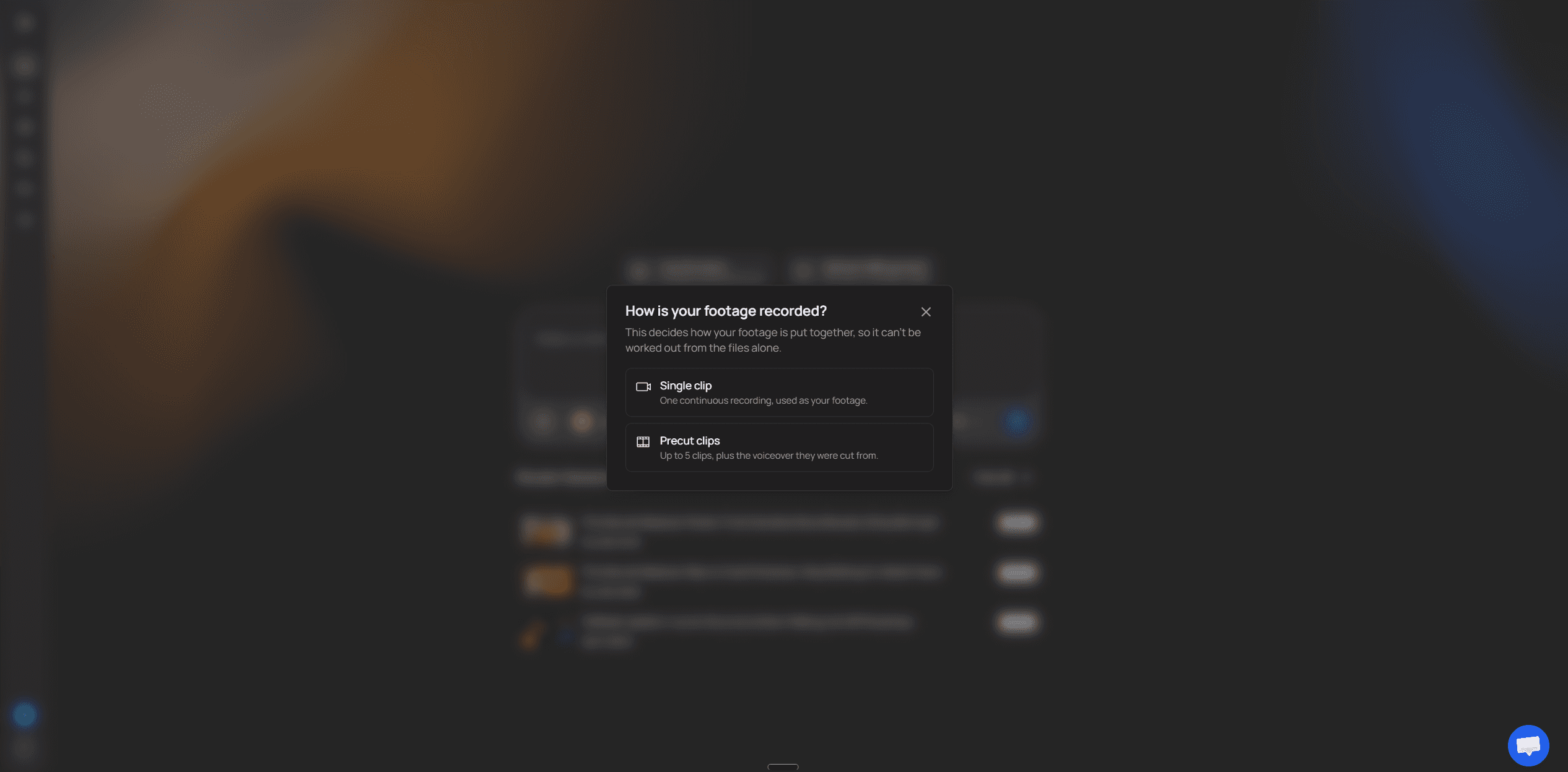
Paste a script or a prompt. Or choose Upload talking head, then Single clip (one continuous recording that VidRush cuts for you) or Precut clips (up to five clips plus the voiceover they were cut from, used exactly as supplied).
Upload the recording: MP4, MOV or WebM, one speaker, English, 6 minutes to 2 hours, up to 5 GB.
Say in the prompt which length you want (6 to 8, 10 to 12, 18 to 20, 30 to 40 or 50 to 60 minutes) and whether to cut your greeting. A single clip finishes at about 90% of its raw length.
Check the Quote statement: title, duration, voice, editing format and the estimated credits. Nothing is spent until you approve it.
Come back to the edit. Dead air and filler are cut, B-roll and motion graphics are laid over the narration, and captions are styled. Most videos render inside an hour; at peak it can run to several hours.
What a 10-minute video costs
The entry Starter plan covers about 45 finished minutes, which works out to $2.18 a minute, or about $21.80 for a 10-minute video. On Creator, with about 136 minutes, the same video is about $17.50. The $24.75 in the cost table is the same Starter plan spread over four uploads: you pay for 45 minutes and use 40. For your own number, multiply your minutes per video by your uploads a month and pick the plan that covers it.
If you were about to put $500 to $1,300 a month into a human team, that gap is real: the human services above run $124 to $305 a video at four uploads a month. It is software, though. It won't make the narrative calls a good editor makes, or build bespoke animation or multi-camera cuts.
There is no free tier or trial, and refunds cover technical generation defects only, so the first month is a paid test. Don't compare it to an editor on price alone. Compare it on one question: after your pass, would you publish it?
The last 20% is still yours
The edit comes back about 80% finished, and you fix the rest in the browser timeline: swap a clip for stock or your own file, correct a caption typo, pull the music down under your voice. There is no revision round to wait on.
You can also ask Rush Agent for a change. It is in early beta and works best on stretches of about 30 seconds. A full re-render costs about a tenth of the original credits, and the rest of what the VidRush editor does after the first render is on its feature page.
Do the pass properly. In the demos we went through, presenters called the fixes minor or none, yet one switched off the flip transitions because they "don't work that well" and another had a map of the wrong country on screen. I would not publish a documentary at that level of review. Watch every second once with the script open, because B-roll that shows the wrong place is what viewers notice and comment on.
What the public demos show, and what they skip
Every one of the 9 public demos we went through, made between January 2025 and October 2026, fed in a prompt or a script, and the creator was on camera in the finished video in none of them. The clearest narration-led example is Artificial Quotient's tutorial: the face setting goes to never, and a 12-minute true-crime documentary comes out of narration plus stock footage.
None of those demos shows a creator's own talking-head upload. The one labelled talking head, Create With AI's review, used an AI avatar as the presenter.
That doesn't mean the upload fails. The mode is documented for any solo English recording. No public demo shows it on a creator's own footage, though, so judge it on one recording of yours before you commit a month of videos to it.
If you'd rather not film every video, VidRush's AI Avatar (in beta) can present instead: a preset presenter, or a custom avatar built from one photo of yourself, which is rolling out gradually. The avatar carries the A-roll and B-roll carries the story. It is English only, takes one presenter per video and can't use your own recorded voice. Whether a channel built on your face should use it is your call. For your own recordings, the detail is in how AI editing of talking-head footage works. Narration-led channels weighing VidRush against other AI tools have the faceless AI editor comparison.
Run one real video on a single month
Pick one video you would publish anyway, the script or recording you would otherwise send to an editor.
Take one month on the entry plan. There is no minimum contract, and you can pause.
Narration-led: paste the script. Talking head: upload one solo recording as a single clip.
Watch the finished edit once with your script open, list every wrong clip, and fix it in the timeline.
Decide: if you would publish it after that pass, plan your month around it. If not, cancel and hire a human.
Hiring a freelancer instead: where to look and how to test one this week
Look where editors show YouTube credits you can click, then pay two of them to cut the same short piece of your footage before you hire either. You lose two small fees and a few days, not a whole video and a missed upload.
Where to find editors beyond Fiverr and Upwork
YT Jobs is a hiring board built for YouTube work. You pay a flat fee for a 30-day listing, and by its own figures editors there typically quote from $55 a video at the low end. The useful part is that profiles carry channel credits, so you can check someone's work before you message them.

Creator subreddits cost nothing to post in and take no commission, but you get no escrow and no one to settle a dispute, as Kevin Tabares points out in his outsourcing guide. Upwork and Fiverr take a fee and give you escrow and a public track record in return. For a first hire, pay that fee or the YT Jobs listing. Escrow is worth the money while you don't yet know what a good editor looks like for your channel.
Four checks before the second message
Run four checks on anyone who replies. They are one placement team's screen, from Kierra Maggs at The Creator's Assistant in her list of hiring red flags, and the ones I'd use:
Live, credited links. Ask for 3 to 5 videos on public channels where they are credited in the description or comments. A showreel or a Drive MP4 proves nothing about who cut it.
A walkthrough of their own timeline. A short screen recording of one of their project files, explaining why the cuts sit where they do and where the B-roll came from.
Two retention questions. What is the biggest retention mistake in the first 60 seconds, and which of your videos did they watch and what two pacing changes would they make.
Track record and format match. On Upwork, a 90%+ Job Success Score and repeat clients; on Fiverr, recent orders. Either way, past work in your format, because a gaming editor is not a talking-head editor.
The walkthrough is the one to keep if you only run one. I watched juniors in post houses try to talk through someone else's timeline, and it falls apart within a minute, because you can't explain a cut you didn't make.
Pay two finalists for the same test edit
Send both finalists the same footage, so the only difference between the results is the editor. The steps come from the Increditors hiring guide, one agency's routine from its own client onboardings:
Pick a 3 to 5 minute slice of real raw footage with your usual problems in it: a flubbed line, room noise, a slow stretch.
Pay two finalists $25 to $75 each to cut a 60 to 90 second hook from it. Never ask for free spec work.
Send a brief with one or two reference videos, your fonts and colours, and where music and stock may come from, with a 48 to 72 hour deadline.
Reply to the draft with 2 or 3 timestamped notes, and watch how fast and how well they come back.
Ask for the project file and linked media before the final payment.
The unpaid test is the one to skip. Editors with full calendars decline spec work, so a free test filters for the people with time on their hands.
If a subscription is still in the running, send it the same slice during its trial week or refund window. Then you have three edits of identical footage to choose between.
Make the project file a hard requirement with a freelancer. When you switch editors, a flat MP4 means the next person rebuilds your intro, lower thirds and caption style from scratch, and you pay for that rebuild. Post houses archive projects because clients always come back for a change, and your channel will too.
Questions to ask before you sign, and how to brief the first edit
Send every service four questions by email and keep the replies. A sentence in an email is something you can point at when the third video comes back late, and a promise on a sales call is not. Keep the email to the edit itself; what the platform allows is kept current on our page about YouTube's rules on AI content.
Ask in writing | A good answer | A weak answer |
|---|---|---|
What unit is the cap in, and how long can a long-form video be? | A video count for footage like yours, and a finished length that covers your videos | 'Unlimited', or hours or gigabytes with no conversion into videos |
What does one video cost with a thumbnail, a Short and subtitles added? | One per-video total, in writing | 'It depends on the request' |
Will the same editor cut every video, and who covers when they're away? | A named editor and a named backup | 'Our team handles it' |
Do I get the project file and linked media on my plan? | Included, in writing, at the tier you're buying | No answer, or 'on request' with no terms |
Four questions to send every service before you pay.
Make them convert the cap into videos
I expected caps to be video counts. Only 2 of the 13 services state a plain video count or credits. Four mix several units, three cap editor hours, and two cap raw footage or gigabytes.
An hours cap means nothing until someone converts it for your footage, so make them do it. Write: "I send about 40 minutes of raw footage and want a 12-minute video. How many of those does this plan finish in a month?" Put the finished-length question in the same email, because the 15-minute definitions in the shortlist rule out longer videos. If they also advertise two active requests, ask how many editor hours sit behind them.
A service that answers with a number has thought about your channel. A service that answers with "unlimited" again has told you it won't commit to one, and I would treat that as the answer.
Total the price with everything you publish
Captions were included at the entry tier at 8 of the 13, so they're no longer the usual trap. Still ask, because Vidchops charges $95 a month for long-form subtitles. The real price is the edit plus whatever ships with it. At Replayed, the $195 edit plus the thumbnail and vertical reformat add-ons comes to $343 before any revision time.
In VidRush the base thumbnail is included in the video charge. You get 6 free variations a month, and each one after that costs 15 credits. With a human service, ask for one per-video total that already includes the thumbnail.
Ask who will actually cut your videos
Two reviews show what this question protects. A beCreatives subscriber on Trustpilot says she was moved between editors several times without warning: "Every time, I had to start from scratch building a style guide." A VidPros client says the opposite: "I have had one of the editors for all six years", with a substitute for sick days. These are two single voices and settle nothing about either company.
For a talking-head channel I would make a named editor a deal-breaker. The extra learning rounds from the cost section happen with every new editor, so a rotation means paying for them again each time someone new picks up your footage.
Get the project file in writing
Of the 13 services, 7 say nothing about project files, 4 include them and 1 refuses. Silence doesn't mean yes. beCreatives' terms give you the final approved videos once you've paid, but withhold the editable project files unless that's agreed in writing.
The reason the file matters is the same as with a freelancer. A creator's 2021 post about Vidchops shows the worst case. It's one old report, but the complaint is specific: no usable edits and no project files, "preventing me from even cleaning up their substandard efforts".
With the file, a bad edit is an afternoon of fixes. Without it, you've lost the video. For any provider you expect to keep past the first month, don't sign without that line.
Brief the first edit so one round of notes is enough
Most extra revision rounds are a handover problem: the editor guessed at something you never told them. Hand over five things before the first edit. This list is Vanessa Lau's, one creator's method from six years of working with freelance and agency editors, and her video on working with an editor is the best version of it I've seen written down:
Film in chunks and delete false starts as you go, so the editor gets 10 to 20 usable clips instead of one long take full of mistakes.
Write a one-page brand sheet with your colour codes, font files, music levels and standing rules, like a callout graphic whenever you name a tool.
Send 2 or 3 reference videos with timestamped notes on what to copy, plus one anti-reference showing a style to avoid, such as cheesy stock footage.
Keep a permanent folder of your most common B-roll and graphics, so the editor never stops work to ask you for your logo again.
On the first project, ask for a bare rough cut (dialogue and pacing only, no music or text) and mark it up with timestamps before any styling goes on.
Of those, the rough cut matters most. In edit bays I watched clients give notes on a finished-looking cut, and every note was about a font or a sound effect. Give the same client a bare timeline and the notes are about the story, which is the part that's expensive to fix later.
The anti-reference does more than it looks. "Make it punchy" means ten things to ten editors, while "Not like this, at 2:14" means one. Rob Balasabas adds a smaller habit in his VidPros walkthrough: a 30 to 60 second spoken brief at the start of the raw file, so the instructions travel with the footage.
When the draft comes back, send all your notes in one batch with timestamps. Notes that dribble in over two days turn one round into three.
Is paying for editing worth it for a small channel yet?
Pay for editing when two things are true: your format has stopped changing, and money comes in every month that covers four edits without strain. A subscriber count is the wrong trigger, because subscribers don't pay the invoice. An editor buys you time and a reliable schedule. Don't expect it to buy you views.
Do the arithmetic before you hire
Take the freelance range from the shortlist for a standard long-form edit. Now assume, purely for this sum, that your videos earn $3 to $5 in ad revenue per thousand views. That rate is an illustration, not a claim about your channel or anyone else's. Divide the edit fee by that rate and multiply by 1,000. An edit in the middle of the range needs 30,000 views to pay for itself at $5, and 50,000 at $3. An edit at the top of the range, at $3, needs 100,000.
So on ads alone, each video needs tens of thousands of views before the edit breaks even. If your channel covers the bill, it will probably be through other income, and that's fine. Just know which income is paying.
Vanessa Lau shows one order to do it in, in her editor breakdown. She edited herself while she settled her niche and landed consulting clients. Only once that business brought in about $10,000 a month did she hire an editor, at $165 a video, so the money came from clients. Later she went back to editing solo and made 7 videos in 5 months, against 11 in 4 with an editor. It's her story, and what the editor protected in it was her output.
I learned the other half of this the expensive way. In 2021 I paid a small team to keep a list channel uploading most days. The videos got watched, but the advertisers under that audience weren't there, so it never became a business. The money I spent on production bought a reliable schedule and nothing more.
Cheaper steps before a retainer
A free editor such as CapCut or DaVinci Resolve, if you have more evenings than money and want to learn what a good cut is before you pay for one.
A rough-cut tool such as Descript or Gling, which trims silences and retakes from your own recording and leaves B-roll and styling to you.
VidRush on its entry plan, if your videos are narration-led or you explain things alone to camera, in English.
One per-video edit from a freelancer or Replayed, saved for the video that matters most this month.
In my own channels, most of the hours in a video went into sourcing and laying B-roll rather than cutting, and where the hours in one video go breaks that down. A small narration-led channel loses those hours every week and can't justify $500 to $1,300 a month to buy them back.
Software that lays the B-roll in for you, as covered in the software section, is the step that fits that gap. You keep publishing on schedule, keep the retainer money, and move to a human editor once your format and income justify it.
Which step to take depends on what you're short of. Short on money, use a free editor. Short on hours with a narration-led format, use software. Short on hours with a format software refuses, buy one edit at a time until the format holds.
How to tell after 3 to 5 videos that it's working
Give any new editor, service or tool three to five videos before you judge it, because the first one tells you almost nothing. These are practical checks, not benchmarks:
Your notes shrink to about one round per video. If video five still needs three rounds, the editor isn't learning your channel.
Drafts land on the day promised. One late draft is bad luck. Two in five is the queue.
Your hours moved to scripting and filming. If you're still spending evenings fixing edits, you're paying twice.
Switch if two of those three fail by video five. Bank two or three finished videos before you start with someone new, so the changeover doesn't cost you an upload.
Until you can say what your next ten videos look like, don't hire anyone. Edit yourself or use software until the format holds, then spend the money on keeping it on schedule.
Compare YouTube editing services by what one finished video costs at the number you upload, not by the monthly sticker. Once or twice a month, pay per video ($100 to $300 from a freelancer). At about four a month, a credit plan like Vidchops ($495 for four) lands near $124 a video, and narration-led or solo-explainer channels can use VidRush software from $99 a month at roughly $25 a video. The common mistake is trusting 'unlimited', because most of those plans edit one video at a time, so read the footnotes and pay for one test edit before you commit.