Theo Brennan
Editor

An AI b roll generator is really three different products under one name. One generates clips, one lays cutaways over your recording, and one builds every visual for a whole video. I work at VidRush, and it's first on this list for that last job. Here's the shortlist by what you're holding:
A script, voiceover or recording you want back as a finished 10 to 30 minute video: VidRush, $99 a month plus a quote per video.
A recording you'll finish in Premiere, Resolve or Final Cut: Gling at $20 a month, or FireCut at $34.
A long recording you'd rather edit in a browser: Kapwing Pro at $24 a month.
A few shots no stock library has: Runway or Kling, at 3 to 6 takes per shot you keep.
Vertical Shorts: OpusClip, whose Starter plan stops at 15 minutes.
Note: How we researched this: in November 2026 we went through 13 AI b-roll tools, the ones on this list plus others in the top Google results. We read each vendor's own pricing page and coded every tool against the same 12 questions. Nothing was tested hands-on, and prices move.
What an AI b-roll generator does, and the three kinds
An AI b-roll generator makes or finds the cutaway shots that play over your narration. It either generates new footage, matches stock to your transcript, or builds every visual for a whole video. If you'd rather source shots yourself, start with b-roll footage for YouTube.
Prompt-to-clip generators turn a text prompt or a still image into a clip a few seconds long, which you place yourself. Runway and Kling are the names you'll meet.
Auto-b-roll editors read your recording's transcript and place cutaways over it. Gling and FireCut hand it back on your own timeline, while Kapwing and OpusClip export a file.
Full-video builders make every visual and return a finished render. In VidRush you paste a script or upload a 10 to 30 minute voiceover or recording, and get a 16:9 rough cut to check in its Scene Editor.
Choose the kind before you look at a price. A generator won't cover a 20-minute talking head, and a builder won't hand you three loose clips. If you're not sure which shots in your edit are cutaways, start with what counts as b-roll.

The 8 best AI b-roll generators, compared
The best AI b-roll generator is the one that takes your material and returns what you'll edit next. The table lines up ten tools on that, plus what the plan with clean b-roll actually costs.
Tool | Kind | What goes in | What comes back | Length on the b-roll plan | Listed monthly-billed price, clean b-roll plan (annual) | Free tier stops at |
|---|---|---|---|---|---|---|
VidRush | Builder | Prompt, script, voiceover or recording | Finished 1080p 16:9 MP4 | 10 to 30 min (Deep Video V2) | $99 ($82.50), plus a quote per video | No free tier |
Gling | Auto-editor | Recording | XML timeline for Premiere, Final Cut, Resolve | 10 h of media a month | $20 ($10) | Not shown |
FireCut | Auto-editor (plugin) | Recording inside Premiere or Resolve | B-roll on your own timeline | 25 h of source video a month | $34 (advertised from $10) | Not shown |
Kapwing | Auto-editor | Recording | MP4 from its browser editor | 120 min | $24 ($16) | 4 min, 720p, watermark |
OpusClip | Auto-editor | Recording | 9:16 clips; XML on Pro | 15 min on Starter | $15 Starter; $29 Pro for AI video b-roll and XML | Watermark, no b-roll |
VEED | Auto-editor | Recording | MP4 from its browser editor | Not stated | Not shown on its page | 720p, watermark, 10 min, one b-roll trial |
CapCut | Editor | Recording plus your own clips | MP4 | n/a | Not in our check | Clean 1080p, but no automatic b-roll |
Runway | Generator | Prompt or image | Loose clips | Clip length | $15 ($12) | 125 one-time credits, 720p, watermark |
Kling | Generator | Prompt or image | Loose clips | Clip length | Not confirmed | 66 daily credits, 720p, watermark, non-commercial |
Luma Dream Machine | Generator | Image or prompt | Loose clips | Clip length | Not in our check | Watermarked drafts, no commercial use |
Listed prices, read from each vendor's own pages in November 2026: the monthly-billed price of the cheapest plan with clean 1080p b-roll, annual rate in brackets. VidRush's per-video V2 cost is an estimated quote shown before you generate. Kling's pricing page returned an error during our check. Prices move.
1. VidRush: b-roll built into a finished long-form YouTube video
Pick VidRush if you want the finished 10 to 30 minute 16:9 video back, not a pile of clips. You give it a prompt, a script, a voiceover or a talking-head recording. It returns a 1080p MP4 with every cutaway made, as a rough cut you check before export.
The subscription is $99 a month billed monthly, or $82.50 billed annually, with no free tier. Each Deep Video V2 video is quoted on top before you commit. At the recommended setting, a 10-minute video comes to roughly $14.40 to $26.20 according to VidRush's docs. It's the highest entry cost here, and you get a finished MP4, not loose clips or a timeline.
2. OpusClip: auto b-roll for short clips
OpusClip is built for vertical Shorts cut from something longer. It suggests b-roll spots in each clip, and you can replace the media at any spot or upload your own. Starter is $15 a month. That matches the headline price, which is rare on this list.
Starter stops at 15 minutes, reframes to 9:16 and allows 3 stock and 3 AI-image b-roll clips a month. AI video b-roll and Premiere or DaVinci export start on Pro at $29. If your videos run 10 minutes or more, start from these OpusClip alternatives.
3. VEED: AI b-roll inside an online editor
VEED suits people who already cut, caption and export in a browser. Its b-roll feature places cutaways from your transcript, paid for with monthly AI credits. The free tier is 720p, watermarked and capped at 10 minutes, with one trial of Magic B-roll. Its monthly price wasn't visible on the page we read, so I'd only trial it if you already edit there.
4. CapCut: free AI b-roll in a desktop and mobile editor
CapCut is the honest answer if you have no budget. The free editor exports clean 1080p and 4K without a watermark. It has no automatic transcript-to-b-roll on the free plan, so you place every cutaway by hand. Paid prices weren't part of our check.
5. Kapwing: collaborative editor with AI b-roll
Kapwing handles long recordings in a browser, and a team can share a project. Pro is listed at $24 a month billed monthly or $16 annually, and exports up to 120 minutes without a watermark. You get an MP4 from its own editor, so Premiere or Resolve users import a flat file. The free plan stops at 4-minute, 720p, watermarked videos.
6. Runway: generate new b-roll clips from text or images
Runway is for the handful of shots no library has. Text or an image goes in, and the Gen-4.5 model returns a clip a few seconds long. Standard is listed at $15 billed monthly, or $12 annually, but credits don't roll over and each kept shot takes several attempts. If that trade doesn't suit you, look at these Runway alternatives.
7. Kling: realistic text-to-video and image-to-video clips
Kling does Runway's job: loose clips from a prompt or a still. We couldn't confirm a paid price, because its pricing page returned an error during our check. The free tier gives 66 credits a day, enough to learn prompting, but it's 720p, watermarked and non-commercial.
8. Luma Dream Machine: animate still images into short clips
Luma suits creators who have the photo but not the shot, turning a still into a moving cutaway a few seconds long. The free tier carries watermarks and allows no commercial use, and paid prices fell outside our check. I'd learn image-to-video on Runway first, where the price is on the page.
How to read the prices
Read every 'from' price as the monthly-billed price of the cheapest plan with clean 1080p b-roll. Across the 13 pricing pages we read in November 2026, the median for that plan was $28.50 a month, against a median advertised 'from' price of $13.50. That median takes in tools beyond the ten in the table, so the rows above won't add up to it on their own. The gap is mostly annual rates shown as monthly, and prices move. No free tier we checked exported clean b-roll, so use one to learn the interface, not to judge output.
In short
Compare tools on the monthly-billed price of the plan with clean 1080p b-roll, not the 'from' price.
Use a free tier to test the interface. Judge the output only on a paid month.
How VidRush makes the b-roll for a full YouTube video
For YouTubers making long videos, VidRush is the AI b-roll generator I'd pick, because it returns the finished 10 to 30 minute 16:9 video with every cutaway placed. You give it a recording, a script, a voiceover, or a prompt of 200 to 10,000 characters. On Deep Video V2 that usually takes 1.5 to 3 hours. With a recording, you use the Talking Head route:
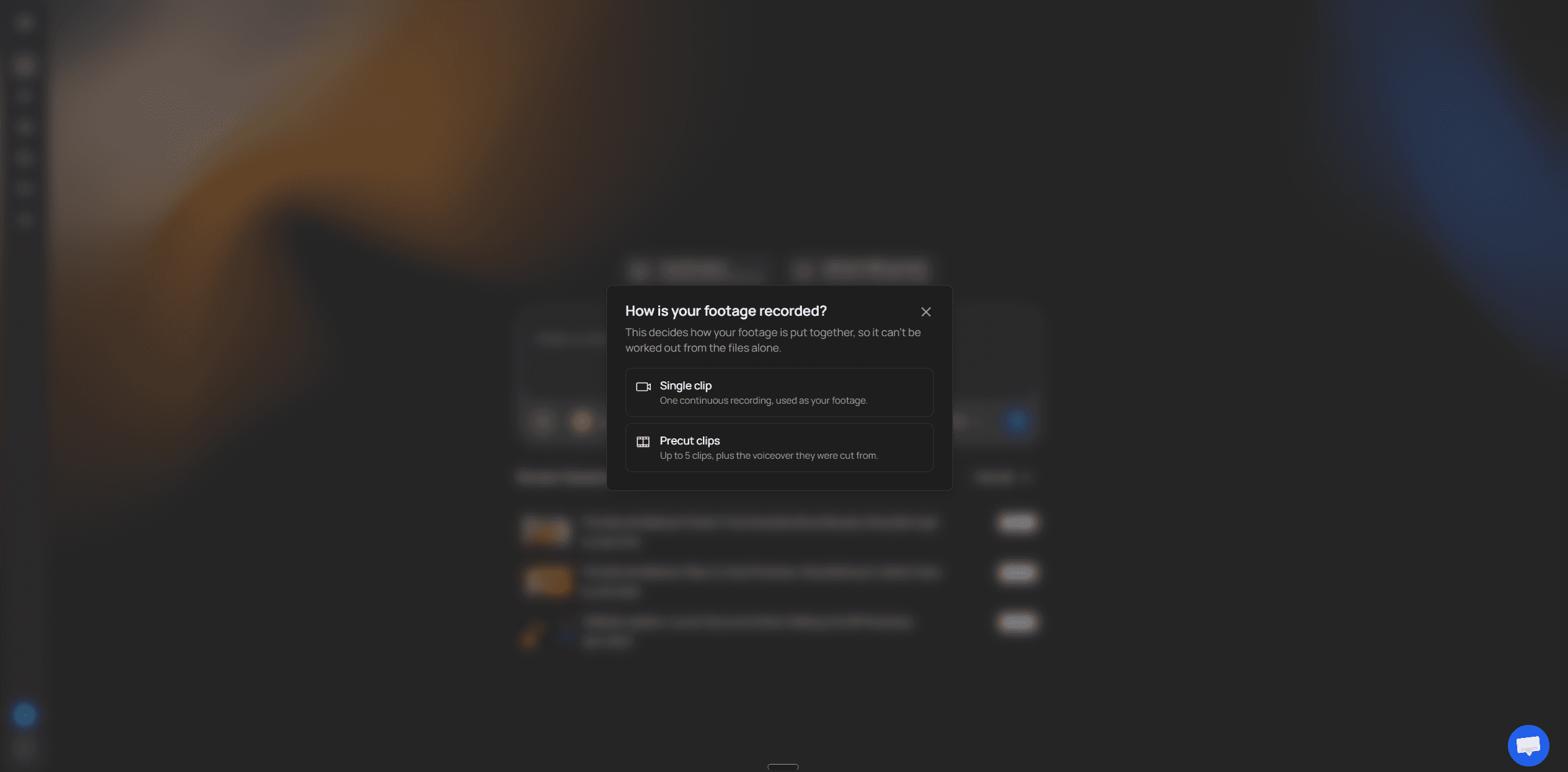
In VidRush Talking Head, choose Single clip and upload the recording: MP4, MOV or WebM up to 5 GB, 10 to 30 minutes on Deep Video V2.
VidRush keeps your audio and cuts pauses and filler. It then layers cutaways and captions over you, built from footage, animation, maps and diagrams matched to what you say.
When the rough cut opens in the Scene Editor, swap any scene that misses.
Export a 1080p 16:9 MP4.
Every cutaway comes from one run, so you review a rough cut instead of sourcing dozens of clips, and there's no editor to hire. Each video is quoted before you commit, on top of the monthly plan. The full workflow is in making a 10 to 30 minute video with AI.
It's worth the money if you publish long-form on a schedule and would otherwise lose evenings to sourcing or pay an editor. Skip it if you make Shorts (use OpusClip) or have no budget (use CapCut). If what you really want is cutaways on your own timeline, that's the split laid out in VidRush vs Gling.
If you finish in Premiere, Resolve or Final Cut
Use Gling or FireCut instead, because both put the b-roll on your own timeline. Gling's $20 plan returns an XML sequence for Premiere, Final Cut or Resolve, and FireCut's $34 Pro plan runs as a plugin inside Premiere and Resolve. I'd start with Gling, because it costs less and its XML opens in all three editors. If you edit yourself, a timeline keeps every cutaway retimable, while a flat render means re-exporting to fix one bad shot.
In short
Want the finished video back: VidRush Talking Head on the monthly plan. You get an MP4, not clips or XML.
Finish in an editor like Premiere or Resolve: start with Gling, or use FireCut if you never leave Premiere or Resolve.
How to generate b-roll with AI: prompts and adding it to your video
For a new clip, write the prompt like a shot description, run several takes and cut the best two seconds into your edit. For a video you already have, let an auto-editor place clips from the transcript. Then scrub the whole track and swap the misses.
Make clips that sit next to camera footage
Budget 3 to 6 takes per kept shot, more for hands and people. That's the estimate in a cost comparison of Runway, Pika and Kling, not our measurement.
Write the prompt as what you want to see: subject, action, camera move, lighting and focal length, such as '35mm, locked-off'.
Bin any take with warped hands, garbled text or wrong reflections. Grading won't save it.
Match the keeper in this order: frame rate, then grade the AI clip to your camera shot, then add grain. That order comes from one studio's conforming method.
Trim it to 1.5 to 2.5 seconds, so the eye has no time to compare it with camera footage.
Clean up auto-placed b-roll
Auto-placement is literal, so a line about burnout can pull fire footage. Treat the track as a rough cut and scrub it. At each miss, either hit Replace and search one or two concrete words, or upload your own clip into the slot without touching the audio.

A VidRush rough cut gets the same pass: click the scene that missed in the Scene Editor, swap its media, then export. You can also @-tag up to 50 of your own files in a Deep Video V2 prompt before generating. For loose generated clips, the model you pick changes what comes back, so look at text-to-video models compared before you buy credits. The rest of the edit is in automating video editing.
In short
Budget several takes per kept shot. Match frame rate, grade and grain, then trim it short.
Never publish auto-placed b-roll unreviewed. Scrub the track and swap the misses.
AI b-roll vs stock footage: cost, licensing and limits
AI b-roll beats stock footage only when no library has the shot. Stock wins for real places, people and events, and it wins on price once retakes are counted.
What one usable cutaway costs
Source | Cost | Basis |
|---|---|---|
Runway take, cheapest settings | $0.72 | Pricing page headline |
Runway take, 5 s at 1080p on the current model | $1.44 | Our reading of the pricing page |
Runway, per shot you keep | About $4.32 to $8.64 | Our arithmetic: $1.44 times 3 to 6 takes |
Storyblocks Essentials, per clip | $0.35 to $0.70 | $21 a month billed annually, 30 to 60 downloads a month |
Single HD clip bought outright | $65 to $79 | One-off licence, e.g. Shutterstock |
Cost per usable cutaway, November 2026. The per-kept-shot figure multiplies a measured price by an estimated take count, so treat it as a range, not a quote.
A generated shot costs several times a flat-rate Storyblocks clip, though it's still far cheaper than buying one HD clip outright. So license what a library already has, using the sites in where to find b-roll footage for YouTube, and generate only the shots nobody filmed.
If you publish in bursts, billing matters as much as price, because Runway's monthly credits don't roll over. I'd buy a generator month to month, only in the months you're actually producing. I'd commit to an annual stock plan only if you upload steadily.
Rights, and what generators still can't do
Generated b-roll isn't automatically royalty-free or safe to use commercially: the paid plan's terms decide, and most pricing pages we read didn't say. The Kling and Luma free tiers allow no commercial use at all. Storyblocks clips downloaded while subscribed keep perpetual commercial rights. Platform rules are a separate question, covered in YouTube's rules on AI content.
The main limitations of AI-generated b-roll are warped hands and text, people and rooms that change between shots, and no way to show an event that really happened. Use real footage for those. Our explainer on how AI video generation works covers why.
When a builder makes more sense
A 20-minute narrated video needs dozens of cutaways, and at that volume sourcing becomes the whole job. On the aviation channel I ran, I spent more nights hunting footage than writing. Pictory and InVideo AI sell the same promise of taking that job off you, and we put them head to head in Pictory alternatives and InVideo alternatives.
If that's your problem, the VidRush walkthrough above is the route. VidRush Deep Video takes your script or a 10 to 30 minute voiceover on Deep Video V2 and sources the visuals for every line, so the cutaway list stops being your job.

Budget that quote on top of the subscription. You're billed on the finished runtime, and any unused reserve comes back.
If you need clips for your own timeline, or you make Shorts, a builder is the wrong buy. If you publish a finished narrated video every week, it's the first thing I'd try.
In short
License what stock has and generate only what it lacks. Once retakes are counted, a generated shot costs several times a flat-rate stock clip.
For a whole narrated video, a builder takes sourcing off you, and VidRush quotes the price before you commit.
Frequently asked questions
Are there free AI b-roll generators?
Yes, but none we checked exports clean b-roll for free. They watermark, cap you at 720p or a few minutes, or bar commercial use. CapCut's free editor exports clean 1080p, but you place the b-roll yourself.
How much do AI b-roll generators cost?
The plan that exports clean 1080p b-roll cost a median $28.50 billed monthly in our November 2026 check of 13 tools. Gling is $20, Kapwing Pro $24, FireCut $34 and VidRush $99 a month plus a quote per video.
Can AI animate still images into b-roll clips?
Yes. Runway, Kling and Luma take a still and return a clip a few seconds long. Expect several takes per kept shot, and check the paid plan's terms before publishing.
Can I upload my own footage alongside AI b-roll?
Yes, in most of these tools. OpusClip lets you upload into any b-roll slot, and Gling and FireCut leave you in your own editor. In VidRush you can @-tag up to 50 of your own files in a Deep Video V2 prompt, or swap them in later in the Scene Editor.
OpusClip vs VEED vs CapCut: which is better for AI b-roll?
Use OpusClip for vertical Shorts, VEED if you already edit in a browser, and CapCut if you have no budget and will place b-roll by hand. For a 10 to 30 minute 16:9 video, I wouldn't start with any of the three.