Theo Brennan
Editor

If you typed "what is a b-roll", the answer is the footage you cut over or between your main footage to show what is being said, set the scene or hide an edit. A-roll is that main footage: you talking to camera, the interview, or the voiceover carrying the story. Open any editor and you can see how the two fit together. The a-roll sits on the bottom video track with its audio and the b-roll sits on the track above it. The voice keeps playing underneath while the picture changes, and that is the part worth remembering.
Most people who ask about b-roll already half know that. In the Reddit threads we read from people confused by the word, more were stuck on what to shoot or where to find it than on what it means, and that is where the hard part of b-roll sits.
Note: How we researched this: we went through 30 English-language YouTube videos with "b-roll" in the title, 15 published between 2019 and 2021 and 15 published in 2025, taken in the order search returned them, to see whether the meaning had drifted. Then we read 17 Reddit threads from 2023 onward where someone asked what b-roll means, what counts, or how to make it, drawn from editing, creator, social-media and marketing communities. Both samples are small. They show how these creators and askers used the word, not how everyone does.
What is b-roll? (And what is a-roll?)
Think Media's a-roll and b-roll walkthrough shows both in one edit. The a-roll is a camera review recorded to the lens. Close-ups of the camera go on the track above, over the lines that describe those features, and those close-ups are the b-roll. The review's audio is never touched, so it plays straight through while the picture moves from face to product and back.

Other words for b-roll
Cutaway is the most common other word, and "supplementary footage" turns up in more formal writing. Inserts and establishing shots are kinds of b-roll, not rival terms.
Cinemadrop's breakdown of b-roll sorts those names by the job each shot does. A wide exterior of a courthouse that tells you where you are is an establishing shot. A close-up of a pen signing a contract is an insert. A shot of someone listening to the speaker is a cutaway. In the edit, all three sit on the same top track.
Why it's called b-roll
You will read that early Hollywood labelled its reels A for main and B for secondary. That version does not hold up. The name started in 16mm film printing, where labs split a cut across two rolls. Odd shots went on roll A and even shots on roll B, with black leader filling the gaps, so the splice lines would not show on screen. Neither roll mattered more than the other. The print needed both.
The meaning we use now came out of TV news. John Premack, a former chief cameraman at WCVB-TV in Boston, describes how newsrooms did it on film: the interview ran on one projector with its sound, and a second reel, mostly black leader with a few seconds of cutaway, ran on another. Master control switched to the second projector over each splice in the interview, then back once the splice had passed. That second reel was the B roll.
I like knowing this because it settles the definition better than any glossary does. B-roll was always the picture you switch to while somebody's sound keeps running. The track above your main clip in a free editor does exactly what that second projector did.
B-roll examples you've already seen
Spot it in a talking-head video
Pick any creator who talks to camera and count the moments their face disappears while their voice carries on. In Katie Steckly's guide to editing b-roll, she is the a-roll, chatting to the lens. The clips of her setting up a tripod, turning a camera dial and writing in her journal are the b-roll. Each one shows the thing her line describes, and her voice never stops on the track below.

Tech reviewers cut to the product in their hands. Cooking channels cut to the pan while the host explains the timing. History channels with no presenter at all run b-roll over a voice for almost the whole video.
The Instagram "b-roll reel"
The Instagram meaning is real, and you will meet it. There, "b-roll" often means a finished post: faceless lifestyle clips (coffee pouring, a walk, hands on a laptop) with on-screen text, trending audio and nobody speaking. Ellis of Soul Centered Marketing teaches b-roll reels exactly this way, as an alternative to talking to camera.
You are not wrong to use the word that way. It is that community's dialect, and I would not spend a minute arguing with it. A b-roll reel uses the same clips an editor would cut over a voice; it just posts them on their own and lets text carry the message. Learn the editing sense first anyway, because it is the one that tells you where a clip goes and how long it stays.
I expected the word to have drifted toward the Instagram meaning by 2025. In our 30 videos it had not: the editing sense held steady, at 9 of the 15 videos in each period.
What "b-roll" meant in the video | 2019 to 2021 (15 videos) | 2025 (15 videos) |
|---|---|---|
Cutaways over a voice or speaker | 9 | 9 |
Cinematic montage set to music | 5 | 2 |
Social clip with text and audio, no speaker | 0 | 2 |
Teaches both the editing and the social meaning | 0 | 2 |
Couldn't tell | 1 | 0 |
Our count of what "b-roll" referred to in 30 YouTube videos with the word in the title, taken in search order. Most were tutorials. No vertical Shorts made it into the sample, so this is a small sample of YouTube videos and not a reading of Instagram or TikTok feeds.
Even tutorials aimed squarely at Instagram Reels and TikTok mostly meant cutaways over a voice. One Reels editing tutorial used b-roll as cutaways over a talking reel, and a TikTok product-video tutorial paired it with a voiceover.
What surprised me was that nobody corrects anyone. In our 17 Reddit threads, 4 askers used "b-roll" the Instagram way, all of them in social or marketing communities, and not one was redirected. The only top answer that corrected an asker went to a photographer, who was told it is a video term.
Natalia Kalinska's 2025 tutorial folds both uses into one sentence: footage you put "over and between your talking", or use on its own with text and music. That is a fair description of how people talk now. As a definition for a beginner it is too loose, because the first half tells you how to edit and the second half only tells you what to post.
The cinematic b-roll montage
The older standalone sense is the speed-ramped montage set to music. In our 2019 to 2021 videos, 5 of 15 used "b-roll" that way, and by 2025 it was down to 2. One 2025 creator, JOVAUGHN, looks back on the "slow motion B-roll era" as a phase online filmmaking has passed through.
My take: a montage like that is built out of b-roll, the way a highlight reel is built out of match footage. The clips were shot to be cut over something. With no voice under them, they stop covering anything and become the main event.
Does it count as b-roll? Stock, photos, screen recordings, a second angle and other grey areas
Ask what the clip is doing. If it sits over or between the track that carries the story, to illustrate a line, place the viewer or cover a cut, it is b-roll. If it is the story, it is a-roll. Where the clip came from, which camera shot it and whether it moves do not decide anything.
Katie Steckly's coffee clips are the cleanest proof. Footage of her making coffee is a-roll when the scene is about her morning. Lay the exact same clips over a talking-head line about her mid-afternoon coffee and they become b-roll. Same footage, different job.
Clip | B-roll when | A-roll when |
|---|---|---|
Stock clip | It is cut over your voice or speaker to show what is being said | Rarely, only when the video is about that footage itself |
Still photo | It sits over narration, usually with a slow pan or zoom, often for history topics where no video exists | Rarely, since a photo has no sound of its own to carry a story |
Screen recording | It is cut over a talking-head review or commentary | The screen is the story, as in a software walkthrough |
AI-generated clip | It is cut over the voice to illustrate a line | Rarely, for the same reason as stock |
Second camera angle | That camera turns away to hands, props or the room | It films the speaker talking: that is multi-cam a-roll |
Voiceover in a faceless video | Never | Always, because it carries the story and sets every cut |
"C-roll" | No settled meaning; sort the clip by its job instead | Same: sort it by its job |
Same clip, different job: what decides whether it's a-roll or b-roll.
Stock footage and AI-generated clips
Stock was the grey area people raised most in our Reddit threads, in 5 of 17. Yes, it counts. A stock clip cut over your voice is b-roll exactly as much as a clip you shot on your phone, and whether you paid for it or downloaded it free changes nothing about its job.
Where I draw the line is fit. Stock starts hurting a video when it matches the keyword instead of the sentence: the narrator says markets panicked and you get a man in a suit frowning at a phone. Generic clips like that read as filler because viewers have already seen them in other people's videos.
AI-generated clips are b-roll on the same terms, and I would use them for generic connecting shots and never as a stand-in for real archive in anything factual. Once a viewer spots an invented image of a real event, they stop trusting the genuine footage around it. That is the pushback documentary creators describe in an r/Filmmakers thread on AI b-roll.
A second camera on you
A second angle of you talking is a-roll. It is still the story, cut as multi-cam. The confusion comes from crews calling their cameras A-cam and B-cam, and Cinemadrop's A-roll vs B-roll guide separates the two cleanly: the camera label is about production, the roll label is about the job in the cut. B-cam can shoot a-roll. A-cam can shoot b-roll once it turns to your hands or the room after you stop talking.
Getting this wrong costs you. File the tight angle of yourself as b-roll and you start treating your best lines as something to cover, when they are the thing everything else covers.
When nobody is on camera
In a voiceover video, the voiceover is the a-roll. It carries the story and sets every cut, and everything on the picture tracks is b-roll laid against it. OverseerOS's guide to editing faceless videos puts it in five words: "The voiceover is your clock." Once the narration is final, you know how long each visual has to cover.
That matches every faceless video I have cut. On the aviation channel there was never a face, so the read got locked first and every visual decision hung off it, because until it existed nobody knew whether a sentence ran two seconds or six.
Inside a faceless edit, the useful split is between the core visuals that carry the explanation (a map, a diagram, the real archive of the event) and the supporting clips that fill around them. The same OverseerOS guide draws that line. Both are b-roll by the definition.
Spend most of your sourcing time on the core visuals. A viewer will sit through a plain filler clip, but a missing map or a fake archive shot loses them, because those are the shots doing the explaining. Finding them is also most of the work of making videos with nobody on camera.
The opposite problem, hours of footage and no voice at all, leaves the clips waiting for an a-roll. One videographer in our threads had years of travel b-roll and nothing to hang it on. My advice is to write and record the voice first. Until then, what you have is a library.
What c-roll means
C-roll has no settled meaning, so if a client or collaborator asks you for it, ask which one they mean. Loopdesk's glossary entry on c-roll calls it an "informal label with no single industry-wide definition", and creators use it for at least four different things:
Mood and texture shots with no direct tie to the line
Footage from a third camera on set
Behind-the-scenes outtakes and bloopers
Personal footage shot with no project in mind
When someone uses it with you, ask which they mean. Label your own clips by job and you will never need the word.
What b-roll actually does in an edit, and when not to use it
B-roll does three jobs. It covers a cut, it shows what the voice is saying, and it compresses time. If you can't say which of those three a planned cutaway is doing, it is decoration, and decoration costs you the one thing the a-roll had going for it, which is a person the viewer can see.
You will read everywhere that b-roll "keeps viewers engaged". Nobody has proved that in general. OpusClip's own write-up on b-roll and watch time notes there is no independent peer-reviewed study that isolates b-roll as the cause of better retention, and that the blanket claims tangle cutaways up with script pacing, topic and audio. So treat b-roll as a set of tools with specific uses. Don't expect it to fix a slow video.
Covering a cut
When you trim a stumble out of a talking-head take, your face jumps. A cutaway over that join hides it, but only if the picture and the sound don't switch on the same frame. Premiere Gal's tutorial on hiding jump cuts shows the difference side by side. Cut to b-roll exactly where the sentence jumps and the edit is obvious. Start the b-roll a little before the audio join and the viewer is already looking at something else when the trim goes past.
Showing what the voice says
This is the job that matters most, and the one most beginner b-roll fails at. A cutaway earns its seconds when it proves the sentence: the actual screen, the actual product, the actual step. A clip that only sits near the topic makes the viewer do work for nothing.
Compressing time
Some things take an hour and deserve ten seconds. The standard move, laid out in StudioBinder's breakdown of scene editing, is three to five shots that each catch a different stage of the process, chained on the top track while the narration runs underneath. A typical run looks like this:
A wide shot of the setup, like the empty desk and the flat-pack box.
A medium shot of the work happening, like the hands and the screwdriver.
A close detail of the result, like the finished drawer sliding shut.
The order is the point. Each shot has to show a step on from the last, or the sequence reads as filler instead of time passing.
How much b-roll a talking-head video needs
Less than you think, and more than none. The only controlled test I found that changed nothing except b-roll coverage is a split test OpusClip ran on one 8-minute video. OpusClip sells editing software, so read it as one company's result on a single video. They made three versions with identical script and audio, and each got over 5,000 views.
The version with no b-roll finished at 66.25% completion. At 40% coverage it reached 83.75%. Pushed to 70% coverage it fell back to 73.75%, and the drop-offs clustered on the rapid cutaways.
That result kills the idea that more b-roll always looks more professional, and it stops there. One video cannot hand you a target for yours. The habit I would take from it: cover the lines that have a job (a cut to hide, a thing to show, a process to shorten) and leave the rest on your face. If you catch yourself covering a line only because it has been a while since the last cutaway, you are building the 70% version.
When to stay on your face
Some lines belong to the person. In the same OpusClip testing, staying on camera through an emotional story kept 12% more viewers than cutting away to evocative b-roll, and calls to action delivered straight to camera converted 40% better than ones spoken over cutaways. Neither surprises me. People trust a face more than a stock sunset.
Keep these on your face:
The emotional beat, where the viewer needs to see you mean it.
The main point of the video, said plainly.
The punchline, because a joke lands on the face that tells it.
The call to action, where you are asking the viewer for something.
A long stretch on your face can start to feel static, and there is a fix that doesn't cut away. Editor Olufemii jumps in closer on a new phrase (roughly 110% to 120% scale) or keyframes a slow push-in over a few seconds. That keeps eye contact and still gives the picture some movement, and any free editor can scale a clip.
He also holds on the face for a beat after an emotional line before cutting away, so the line has time to land.
Faceless videos run b-roll the whole way
Everything about coverage above applies to talking-head videos. With no face, there is nothing to stay on, so b-roll fills the whole picture track over the voiceover. Long-form faceless creator Isaac (isaacverse) colour-codes his whole script into visual types (screen recordings, animations, archival footage, on-screen text) and lays them wall to wall over the narration. Each clip's job shifts from cutaway to keeping the story moving, and variety in shot size does the work a face would do.
Where to get b-roll for your videos
Choose your source by how much footage your video needs, not by what you would like to own. A one-minute phone video needs a handful of cutaways that you can film yourself in a quarter of an hour. A 12-minute voiceover video needs more clips than anyone can film on a phone, and on that kind of video the real cost is the hours spent hunting for them.
How much footage your format needs
One editor comparing vertical and horizontal sourcing estimates a 45-second short at roughly 12 to 18 quick visual hits and a 12-minute horizontal video at 70 to 150 cutaways. Treat those as his ballpark, not targets.
What matters is the gap between them. About a dozen clips is an errand, a hundred is a part-time job, and that gap decides which of the routes below fits you.
Film it yourself on your phone
Start here when your video is short or you are on camera. It costs nothing, and any free editor will handle the rest.
Nate at Think Media films his close-ups at the same desk straight after the talking take, before he moves any lights. That way the b-roll matches the a-roll's light and colour with no correction afterwards. His routine takes him 10 to 15 minutes:
Finish the talking take and leave the lights and camera position exactly where they are.
Read back through your script for the 2 to 4 physical things you mention, such as the product, a button or the app on your phone.
Clear the desk into a small tabletop set under the same light.
Film each action for about 10 seconds, which is much longer than the two or three seconds you will actually use.
Get one wider shot and one tight close-up of each action, so you have two shots to cut between.
Those are the cutaways that prove a line, which are the ones worth having. Drop them on the track above the matching sentences and over your jump cuts, and you have finished a first b-roll pass in any free editor without spending anything.
Film b-roll before you need it. Whenever the camera is already out, spend five extra minutes on your hands, the room and the street outside, and put the clips in one folder with names that say what each one shows. A library you build while you are already set up is the cheapest b-roll you will ever have.
Free stock: costs nothing, runs out on specifics
Pixabay and libraries like it cost $0. They are fine for general shots such as a city street, rain on a window or a laptop on a desk. They run thin as soon as your line is specific: a particular action, a named product, an event from a particular year. The search matches keywords rather than meaning, so you get near-misses, the same keyword-versus-sentence problem stock has everywhere.
For a short with three cutaways, free stock is all you need. For a 15-minute documentary I would not plan around it, because the specific shots carry the explanation and free libraries are least likely to have them. Where a clip comes from is a separate question from what the platform allows you to do with it, and our page on YouTube's AI content policy handles that side.
Flat-rate stock: a bigger pool, the same hunt
A subscription gives you a much larger library to search. At the time of writing, Storyblocks Essentials is $21 a month billed annually, and Envato Elements costs about $16.50 a month on an annual plan. Buying single clips from the big agencies, at $50 to $200 each, makes no sense when you need dozens of them.

A subscription saves you money per clip. It does not do the searching. For every line you still decide what would prove it, type a search, scroll, preview, download, trim and place the clip. On the aviation channel I ran, I spent more nights sourcing footage than writing scripts, and paying for a library did not change that much. It shortened each search. It did not shorten the list.
One r/NewTubers creator editing a 10 to 15 minute documentary-style video described the problem plainly: even for one minute of narration, finding footage that actually fits the narrative takes me hours. The creators in the threads we read who put a number on sourcing a video that length reported two to four hours with a paid library, and longer when they were digging through free stock.
That range is reported, not measured, but it matches my experience: on my own channels I spent more nights sourcing footage than writing scripts. Very little of that time goes on owning footage. Almost all of it goes on matching clips to sentences, and the work grows with every minute of runtime, which is a large part of why one faceless video can eat ten hours or more.
Long-form talking-head and voiceover videos: VidRush
I work at VidRush, and that hunt is the job it was built for. If you make 6 to 60 minute horizontal videos where finding footage is the slow part, you paste your script, upload a voiceover (MP3 or WAV), or upload a single-speaker recording of yourself talking to camera. VidRush then matches stock and archive footage to your narration line by line, from Storyblocks and archive sources, so you don't search for and place each clip by hand.
You get back an editable cut on a timeline. Your script lines run across the top, the matched clips sit on the tracks below, and your narration runs along the bottom. For a talking-head recording, it also cuts dead air and filler before laying the b-roll over the top. You can match b-roll to a talking-head recording in English.
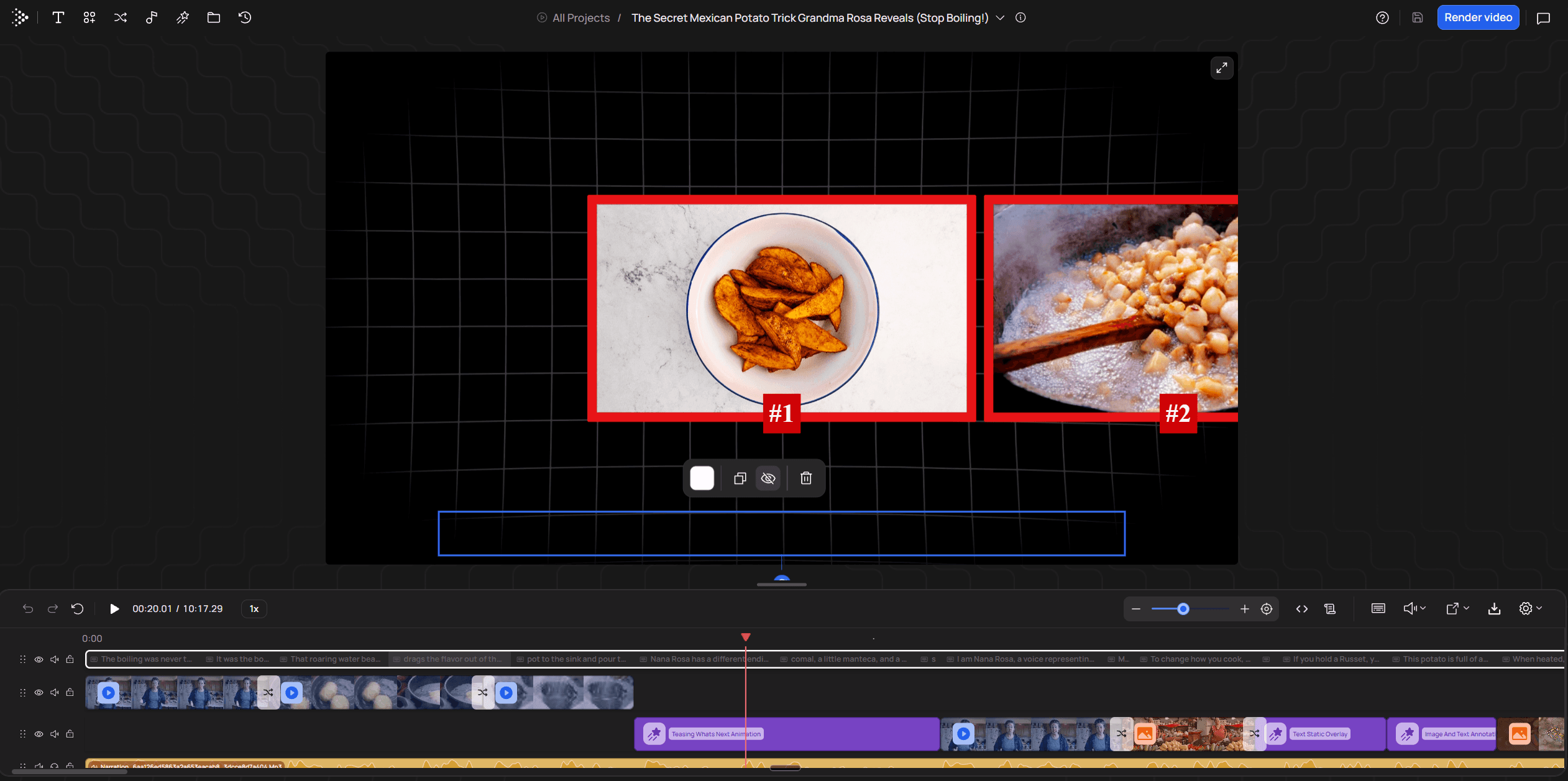
You still review it yourself. Treat the first cut as roughly 80% of the way there. Play it through and swap any clip that only decorates its line instead of proving it, the same fit test you would apply to stock you found yourself. You can swap, retime or replace clips in the editor before you render.
At the time of writing, Starter is $99 a month ($79.20 billed annually) for about 45 finished minutes, and Creator is $239 a month for about 136. There is no free tier and no trial, which is a lot to spend while you are still learning what b-roll is. The fair comparison is against the evenings you currently spend hunting, or what an editor would charge to source a long video, rather than against a free library.
Tip: Cut your first video on the free route before you pay for anything. If what eats your week turns out to be the hunt, on 6 to 60 minute horizontal videos built from a script, a voiceover or a talking-head recording, that is the job the $99 a month plan is for. If you are making Shorts, it is not your tool.
Shorts, Reels and TikToks
For vertical video, film on your phone. Cropping horizontal stock to 9:16 throws away about two thirds of the frame, often including the action you wanted, while your phone already shoots vertical. Cut it in any free editor. For vertical clips cut out of a longer recording, a clipper like Opus Clip reframes the speaker and adds b-roll overlays. It has a free watermarked tier, and paid plans start at $15 a month.
Which route fits your video
My recommendation: if you are on camera and the video is short, film on your phone first and fill gaps from free stock. If you make long-form horizontal videos with a voice or a talking head, have VidRush match the footage and spend your time on the review pass instead of the search. A flat-rate subscription is worth paying for once you edit long videos by hand every week, because free libraries keep failing you on the specific shots.
Route | Cost (at time of writing) | Time per video | Fits | Runs out when |
|---|---|---|---|---|
VidRush | $99/mo Starter, no free tier or trial | No manual search; you review and swap clips | 6 to 60 minute horizontal talking-head or voiceover videos | You need Shorts, vertical, vlogs, tutorials or anything under 6 minutes |
Phone, filmed right after recording | $0 | 10 to 15 minutes for a few close-ups | Shorts and talking-head videos with 2 to 4 physical things to show | A long video needs dozens of shots you cannot stage |
Free stock (Pixabay and similar) | $0 | Creators report several hours on a long video | General scene-setting shots | Your line is about a specific action, product or event |
Flat-rate stock (Storyblocks, Envato Elements) | From about $16.50 to $21/mo billed annually | Creators report 2 to 4 hours on a long video | Long videos you edit by hand | You still search and match every clip yourself |
Vertical clipper (Opus Clip) | Free watermarked tier; from $15/mo | n/a | Vertical clips cut from a longer recording | You need a horizontal or long-form edit |
Where your b-roll comes from depends on how much footage your format needs. Hours are what creators report, not measurements.
How to use b-roll so it looks deliberate
Four timeline decisions separate cheap-looking b-roll from deliberate b-roll: which lines get a cutaway, what goes on them, how long each stays, and how you cut in and out. The camera that shot the clips is not one of them. Make the four on purpose and phone footage looks planned. Make them by feel and paid stock looks like filler.
Mark the lines before you touch a clip
Play your trimmed a-roll once and drop a marker on every line that asks to be seen. Do this on the trimmed version, because every trim moves every line after it. Cutting the raw recording down is its own job, and editing talking-head footage end to end covers that pass. The lines worth marking are usually these:
Named things, such as a product, a place, a person or a document.
Claims with a number or a fact behind them.
Processes, where something happens in steps.
Comparisons, before and after or this against that.
Anchor words, the one word in a sentence that carries its feeling.
Anything you did not mark stays on your face. Don't cut on a timer, every five or eight seconds. A cutaway on a fixed rhythm lands wherever the clock says, which is often halfway through a thought that had nothing to show.
Anchor words deserve the most care. In a b-roll lesson from editor Paddy Bird, an athlete calls the moments before kickoff "the most terrifying seconds". Wide shots of the stadium and the warm-up drills fall flat over that line. A tight shot of one player's stare, placed on the word "terrifying", makes it land. Put your strongest clip on the anchor word, not at the start of the sentence it sits in.
Show the most useful thing you can get
For each marked line, reach for the clip that tells the viewer something the voice alone cannot. In OpusClip's retention-curve analysis, cutaways that demonstrated the line, like a screen capture of the exact thing, lifted moment-by-moment retention by 3% to 7% over talking-head segments, while loosely matched stock (their example is random office typing over talk about marketing) produced no gain and in places small dips.
When you have more than one option for a line, pick the one the viewer could check, because a document on screen persuades where a mood shot only decorates. OverseerOS ranks cutaways from proof down to decoration, and the order matches what I watched work in the edit bay:
Proof: the document, the filing, the chart, the receipt.
Demonstration: the process actually happening, step by step.
The specific thing: the exact person, product or place the line names.
Context: where and when, the establishing shot.
Metaphor: an image that stands for the idea.
Decoration: generic stock that sits near the topic.
OverseerOS's example is a line saying a company lost $3.7 billion in under two years. The weak cutaway is a businessman typing on a laptop. The useful ones are the company's headquarters, the filing excerpt, a chart of the losses or the share price falling. Every one of those adds evidence. The typist only adds movement.
The bottom of that list is where beginners live, because a stock search turns the word into a picture. You say "money" and get hands counting cash. You say "stress" and get someone rubbing their temples. My test is blunt: if the clip would fit any video that used the same word, it is decoration.
The top rungs are usually closer than you think. On a talking-head channel they are your screen, your product and your own paperwork. On the aviation channel I ran, the stock that worked showed the specific thing: the right aircraft type, the right kind of airport, the weather that mattered.
Hold each clip until it has been read
Keep a clip on screen until the viewer has taken in what it shows, then cut. How long that takes depends on what is in the frame. OverseerOS's pacing guide gives these starting ranges:
What's in the clip | Starting hold |
|---|---|
Any cutaway in a vertical short | 1.5 to 3 seconds |
A simple object or action in a long video | 2 to 5 seconds |
An establishing shot | 2 to 6 seconds |
An emotional moment | 4 to 8 seconds or more |
A chart, document or screen recording | 5 to 12 seconds or more |
Starting ranges from OverseerOS's guide. Adjust by eye: the clip is done when it has been read.
OverseerOS also timed 4,792 scenes across 35 long-form faceless projects. The median scene ran 3.66 seconds, and 81% ran under 6 seconds.
That is their analysis of voiceover-led faceless edits, not talking heads, and not ours. It describes what is typical in that format. It does not show that cutting faster keeps more people watching.
Most beginners get the chart wrong. A chart cut after two seconds is worse than no chart, because the viewer sees that there was information and loses it before they can read it. Cutting bank ads taught me that a cut gets argued over in frames, and the argument was nearly always about whether the viewer had finished reading the packshot.
The opposite fix matters just as much. One strong visual can carry two or three sentences if something in it changes, like a highlight appearing on the chart, a slow push in or a crop to the next figure. A video feels fast when new information keeps arriving, and swapping to a fresh stock clip every sentence only turns the edit into a slideshow.
Cut in and out with split edits
Most cutaways are plain straight cuts. They feel smooth when the sound and the picture do not change on the same frame. You get that with two kinds of split edit, both of which any free editor with separate audio and video tracks can do:
An L-cut lets the outgoing sound run on after the picture changes. One free editor's guide to J-cuts and L-cuts suggests letting it run 0.5 to 1.5 seconds.
A J-cut brings the incoming sound in before the picture arrives. The same guide puts the lead at 6 to 12 frames, roughly 200 to 400 milliseconds.
The b-roll's own sound, like a pour, a click or room noise, stays in rather than muted. The guide ducks it about 15 to 20 dB under the voice.

On the timeline, an L-cut shows as the audio clip reaching past the end of its picture, and a J-cut shows as the audio starting before its picture. To make one, unlink the clip's audio from its video and drag the audio edge left or right. Your voice keeps running underneath any b-roll on the track above, so most of the time you are adjusting the moment you come back to your face, or the moment a cutaway's own sound arrives.
Split edits hide a jump in the picture, and nothing more. A cutaway does nothing for a word clipped in half or a breath that stops dead, because those are sound problems, so fix the audio join before you lay anything over it.
Leave the transition presets alone. A whip pan or zoom on every cutaway draws attention to the cut, which is the opposite of what the cut is for. I would rather see a hundred plain cuts with the sound offset than one spin transition.
Four mistakes that make b-roll look cheap
Cluttered frames make the viewer hunt for the subject. Filmmaker Matti Haapoja's fix is to punch in until the subject is obvious at a glance.
Clashing direction jolts the viewer. Someone walking left to right, followed by a shot moving right to left, reads as wrong even when nobody can say why, so keep movement flowing the same way across consecutive cuts.
Lone clips read as filler. One disconnected shot dropped into a sentence looks random, while the same shot inside a wide, medium and close run looks planned.
Drifting handheld looks like an accident. A shot should be either locked still or making a clear, steady move, and a slow sway in between does neither.
The first two are fixable in the edit: scale the clip up, or flip the shot order. The last two are mostly fixed at the shoot, so if your library is full of swaying single shots, pick the steadiest frame of each and use it for less time.
Try it on your next video: a 60-second b-roll exercise
Explain a routine you could do with your eyes shut, like making coffee or packing a bag, and put b-roll over it. A 60-second process like this is a common first drill among editing teachers, including this beginner b-roll guide, because it is short enough to finish tonight and full of things to show. You need a phone and any free editor with two video tracks.
Record 30 to 60 seconds explaining the routine, to camera or as a voiceover.
Trim it until it works on sound alone. Lay no b-roll yet, because every trim moves the lines after it.
Film 6 to 8 clips of the routine: one wide, two medium and three close, plus a spare or two.
Put them on the track above, over the jump cuts and the lines you marked, holding each for 2 to 4 seconds.
Export it and watch it next to the version with no b-roll.
☐ Each cutaway starts on the word that called for it.
☐ Each clip shows the thing itself, not a picture of the word.
☐ Each clip leaves as soon as it has been read.
☐ Your eye never has to hunt for the subject or jump across the frame.
☐ Second try: turn the straight cuts into J-cuts and L-cuts.
When one check fails, it is usually the second. You grabbed the clip that matched the word instead of the one that showed the step. Swap it for a shot of the actual hands doing the actual thing, watch the minute again, and you will see the difference before you can explain it.
Frequently asked questions
What gear and settings make b-roll look cinematic?
None that a beginner needs to buy. A phone shot held still, in the same light as your talking take, cuts in cleanly. Most of what reads as polished in an edit comes from choosing the right clip and holding it for the right time, not from the camera.
Can I use the same b-roll clip twice in one video?
Yes, if it shows the same thing again, as a callback to an earlier point. Reusing a clip to fill a gap reads as running out of footage, and viewers notice repeats faster than you expect. If you need filler, the line probably should have stayed on your face.
Do I need b-roll in every video?
No. A short talking-head video with nothing physical to show can work entirely on your face, especially if you punch in now and then. A voiceover video is the exception, because without b-roll there is no picture at all.