Theo Brennan
Editor

The best Pictory alternative depends on why you're leaving. If Pictory shows the wrong footage for named places or people, a cheaper tool that picks stock by keyword won't fix it. Match your reason to the tool built for it:
Long-form YouTube documentaries and explainers, 6 to 60 minutes: VidRush.
The closest like-for-like drafts from a prompt: InVideo AI.
Blog posts to branded video: Lumen5. Narration in other languages: Fliki.
A standalone presenter clip for training or sales: HeyGen. Social clips on a real timeline: VEED.
Visuals no stock library has: Runway.
Then find the plan cap that runs out first. It is rarely the headline number. I work at VidRush, so it sits first here, but only for the long-form job it was built for.
Note: How we researched this: we read the vendors' pricing pages, plan tables and help docs as of October 2026, plus an October 2025 capture of Pictory's page. For five entry plans, we worked out how many 8-minute narrated 1080p videos each allows once every cap applies. We also read 4 Reddit posts from people leaving Pictory and 6 threads from Descript and InVideo AI users who hit a usage limit. Those are individual stories, not a measure of how common each problem is.
Is Pictory AI good, and why do people look for an alternative?
Pictory is good at turning a finished script, blog URL or slide deck into a stock-footage draft fast. In one of the 2026 Pictory reviews we watched, a 2-minute draft came back in about a minute. Scene swaps cost nothing extra. For generic business explainers on Starter at $29 a month, that's still a fair deal.
The people who left describe a different problem. We read four Reddit posts from past users explaining why they wanted out. None said their videos had changed. They wanted the same videos done better.
One Roman empire script got 'modern Italy stock', and another user got pyramids for Stonehenge. A third was tired of the pricing model and was weighing iMovie.
Keyword matching reads 'Rome' and finds Italy, because no stock library files the right shot under the word you typed. I spent enough nights hunting airframes for the aviation channel I ran to know a bigger library doesn't fix that.
If your scripts name places, people or periods, you've outgrown keyword matching. That's the step where AI video tools pick the footage for each line, and it breaks first. If your scripts are generic explainers, Pictory may still be your cheapest fit.
Long scripts about named subjects are the case VidRush was built for. It searches for footage line by line against the narration, in public archives as well as Storyblocks. You still check the named scenes yourself before trusting it.
In short
Pictory still suits generic explainers built from a finished script.
If your scripts name places, people or periods, keyword-matched stock is the problem to fix.
Name your reason for leaving before you compare tools.
The 8 best Pictory alternatives, by the job you need done
Find your reason for leaving in the first column. The last column is the catch. For jobs between these eight, the wider field of AI tools for faceless YouTube videos has more options.
Your reason for leaving | Tool | What goes in | What comes out | The catch |
|---|---|---|---|---|
Long YouTube videos, wrong scenes, hours of fixing | VidRush | Prompt, script, voiceover, talking-head recording, or a script driving an AI avatar host (beta) | Finished 6 to 60 minute 16:9 video on a timeline | $99 a month, no free plan or trial, horizontal only |
Same workflow, different tool | InVideo AI | A prompt | Voiced, captioned draft with stock and generated clips | Chat edits cost credits on every turn |
Blog posts for a brand | Lumen5 | Blog URL or pasted text | Branded, slide-style video | 10-minute cap, 720p on Basic |
Narration in other languages | Fliki | Script, prompt or URL | Stock video with 2,000+ voices | Voice edits and re-exports cost credits again, 15-minute cap on Standard |
Presenter clip for training, sales or ads (not long-form YouTube) | HeyGen | Script or audio | AI presenter video | Presenter only, about 12.5 to 19.3 minutes a month on Creator |
Edit a recording by its transcript | Descript | Recorded audio or video | Recording edited through its transcript | Won't build a video from a bare script |
Social clips on a real timeline | VEED | Your clips, short scripts | Captioned social video | AI scripts capped at 5,000 characters, 20 voice minutes a month on Creator |
Stock can't show the subject | Runway | Text or image prompt | 5 to 10 second raw clips | No narration, no assembly |
Pick by the problem you're escaping: each alternative, what it takes, what it gives back and its catch. Limits as stated on the vendors' own pages, October 2026.
1. VidRush: finished long-form YouTube videos
VidRush suits 8 to 30-minute YouTube documentaries and explainers. Paste a script, prompt or voiceover, or upload a talking-head recording. You get back a finished 16:9 video of 6 to 60 minutes. It has narration, captions, music and footage searched for each line.
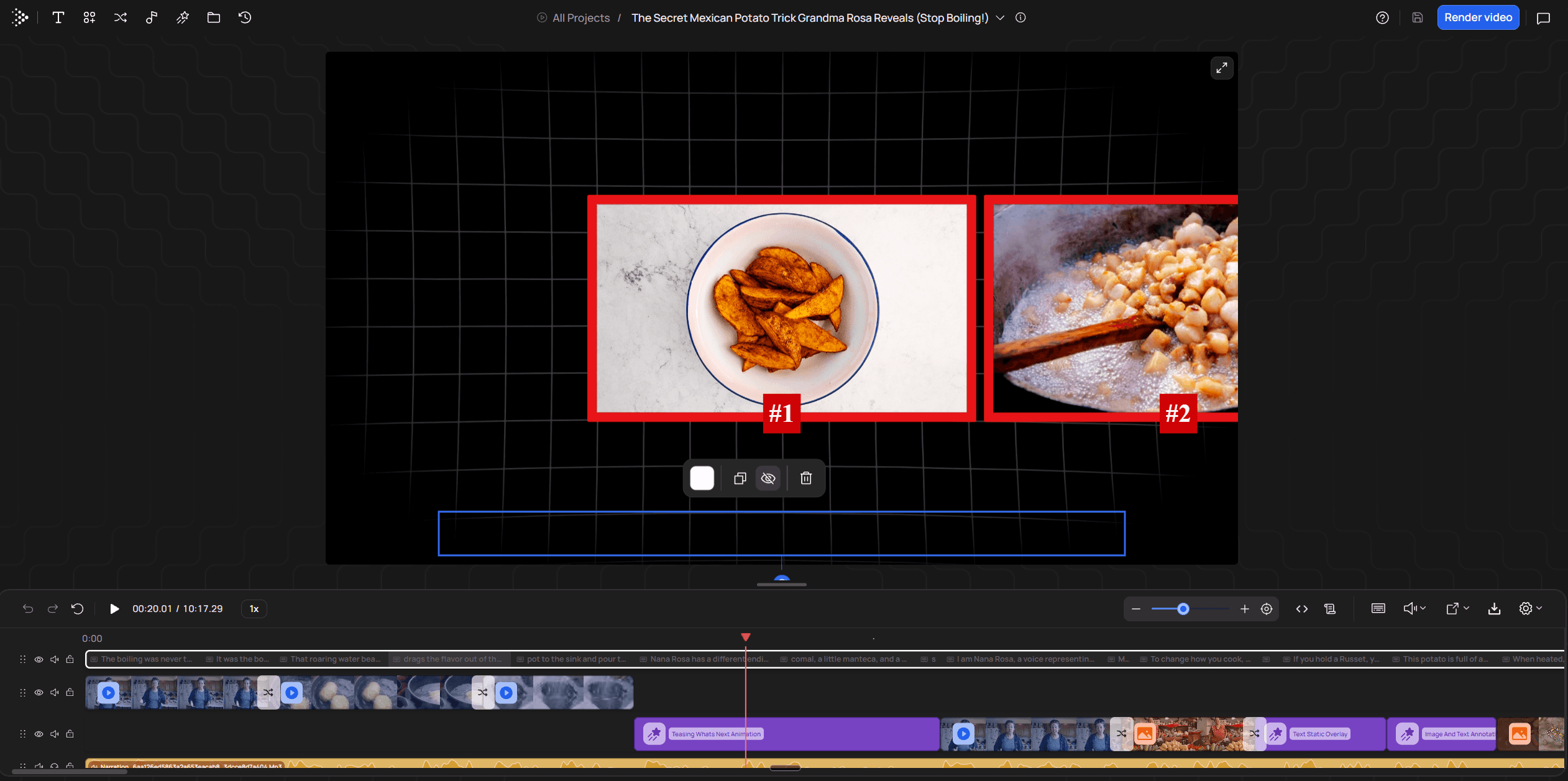
Pictory hands you a stack of scene cards. VidRush hands back a whole edit on a timeline. Before anything is charged, you see how it read your brief and the credit estimate. A wrong scene re-renders for about a tenth of the original credits. A script can also drive an AI avatar host (beta), with B-roll carrying the story.
2. InVideo AI: closest to Pictory's prompt-to-video workflow
InVideo AI is the closest swap. Text goes in through a chat, and a voiced draft comes out with stock and generated clips. In one creator's side-by-side test, it rewrote the script instead of using it word for word. Generation took about seven and a half minutes. Starter is $20 a month.
Pictory vs InVideo AI comes down to your starting point. If you paste finished scripts, Pictory is faster and fixes are free. If you start from a loose topic, InVideo AI adds generated clips where stock misses. In that test, each chat edit cost 10 to 50+ credits. A manual swap in the Edit Media panel cost none.
3. Lumen5: blog posts and articles to branded videos
Against Pictory on blog posts, Lumen5 is the specialist. It pulls cleaner key points from an article and enforces a brand kit. The results look like animated slide decks, not YouTube explainers. Basic was $19 a month billed yearly when we read the page.
The catch is limits. Videos stop at 10 minutes, Basic exports 720p only, and you get 20 voice minutes a month. That's fine for a LinkedIn post. For YouTube I'd rule it out, because long videos get watched on TVs and 720p stock looks soft there.
4. Fliki: low-cost text-to-video with AI voices
Fliki is the narration-first pick: more than 2,000 voices in 80+ languages over stock footage, with Standard at $28 a month. Fixes are where it hurts. Changing the text or voice settings costs credits again. Every re-export costs 0.1 credits a minute, and Standard videos cap at 15 minutes.
That billing punishes scripts you rework line by line. I'd use Fliki for a finished script you want narrated in another language, not one you're still rewriting.
5. Synthesia: AI avatar presenters for training and business
The avatar studio usually listed here is built for corporate training, and we didn't price it. HeyGen is the presenter tool we could check. It turns a script or audio track into lip-synced presenter video in 175+ languages. HeyGen's Creator plan gives 600 credits a month. At 31 to 48 credits a minute, that's about 12.5 to 19.3 minutes of video.
You get a realistic host without a camera. HeyGen stops at the presenter, though, and won't build B-roll around them. For long-form YouTube, a script in VidRush can drive a YouTube video with an AI presenter inside a full edit.
6. Opus Clip: long videos into short social clips
Cutting a long recording into Shorts is the job clippers like Opus Clip are built for, and VidRush doesn't do it. We didn't read Opus Clip's plans, so check its price on its own page.
To cut social clips yourself, VEED gives you a multi-track timeline with strong captions. Manual cuts don't use credits. Its Creator plan caps AI scripts at 5,000 characters, about 3 to 4 minutes. Voice is capped at 20 minutes a month.
7. Runway: original AI-generated footage
Runway is for visuals no stock library has: sci-fi, concepts, surreal scenes. It generates 5 to 10 second clips with camera controls. Standard is $15 a month for 625 credits, about 52 seconds of Gen-4.5 footage. The clips come raw, with no narration or assembly. Use it for the one shot stock can't supply.
8. Steve.AI: animated explainer videos
Steve.AI makes animated explainers, with characters and motion graphics instead of footage. We didn't read its plans, so check its price on its own page. Animation sidesteps the footage problem, but cartoons read as a different channel. None of the leavers we read wanted a new format.
In short
Wrong footage on named subjects won't be fixed by another tool that picks stock by keyword.
Generated-clip tools sell seconds of raw footage, and you still need a narrated edit around them.
How VidRush turns a prompt or script into a finished YouTube video
Used as a faceless YouTube video tool, VidRush hands back a finished edit, not scene cards. The VidRush text-to-video generator takes a script as it is. Talking-head video editing adds B-roll to your own recording.
Bring one input: a prompt (200 to 10,000 characters), a finished script (780 characters up to about an hour of narration), your voiceover (MP3 or WAV, 6 to 60 minutes) or a talking-head recording (English, 6 minutes to 2 hours).
Read the confirmation screen. It shows how VidRush read your brief (format, length, voice, title), then the credit estimate. Nothing is charged until you approve, and a failed generation costs nothing.
Close the tab. Rendering happens in the cloud and usually takes about an hour, up to 5 hours at peak times.
Open the result on the timeline and fix whatever is wrong before you export.
Fixing one wrong scene
Say the narration covers a Soviet fighter and the first six seconds show the wrong jet. Select the clip and use Replace Media to search Storyblocks, your library, a local upload or a URL. Or ask the Rush Agent (beta): 'Replace this with video of a Soviet fighter jet between 0:00 and 0:06'. The re-render costs about 10% of the original credits.
What it costs, and who should skip it
Starter is $99 billed monthly, or $82.50 a month annually. Script, voice, footage and fixes all come out of one credit pool. An 8-minute video uses roughly 350 credits, so Starter's 2,000 make about 5 to 6. Budget three fixes each and it's about 4. Set that against the evenings you spend assembling each video, or a freelance editor's fee.
Skip it if you make Shorts, vertical video, tutorials, reactions, gaming or compilations. If your topic has little real footage online, expect generic stock. It produces from your brief, so pick your niche first. Starting a faceless channel covers that.
In short
A script, voiceover, prompt or recording goes in, and a finished 16:9 edit comes back in about an hour.
Fixes come out of the same credits, so plan on about four 8-minute videos on Starter, not six.
There's no trial, and it makes long-form only.
Pictory alternatives compared: price, output and free plans
Most entry plans cost $15 to $29 a month, close to Pictory's own Starter. VidRush starts at $99 with no free trial, because it returns a finished long-form edit. Weigh it against your editing hours or a freelancer, not $20 clip tools. Either way, find the cap you'll hit first and divide it by your video length.
Plan | Price a month | Headline allowance | First limit you hit | Finished 8-min videos | Source |
|---|---|---|---|---|---|
Pictory Starter | $29 ($25 annual) | 200 export minutes | 60 premium voice minutes | About 7.5 | Counted by us |
InVideo AI Starter | $20 | 400 credits | 100 premium stock clips | 2.5, if every clip is premium | Counted by us |
InVideo AI Plus | $60 | Credits | 200 premium stock clips | 5, if every clip is premium | Counted by us |
Lumen5 Basic | $19 billed yearly | Unlimited videos | 720p export only | 0 at 1080p | Counted by us |
VidRush Starter | $99 ($82.50 annual) | 2,000 credits | The same credit pool | About 5.7 | Counted by us |
Fliki Standard | $28 | 180 credits | 15-minute cap per video | Not counted | Vendor-stated |
HeyGen Creator | $29 | 600 credits | 31 to 48 credits a minute | 12.5 to 19.3 minutes of presenter video | Vendor-stated |
VEED Creator | $29 | Unmetered timeline cuts | 20 voice minutes a month | Not counted | Vendor-stated |
Runway Standard | $15 | 625 credits | 12 credits a second | About 52 seconds of raw clips | Vendor-stated |
Headline allowance against the limit that actually runs out first, entry plans as of October 2026. 'Counted by us' means 8-minute narrated 1080p videos once every stated cap is applied; your own length changes the answer.
On the plans we counted, the first cap was rarely the headline figure. It was voice minutes on Pictory, premium stock clips on InVideo AI and resolution on Lumen5 Basic. On VidRush, the credits were the real limit.
Pictory shows the gap most clearly. Its Starter plan card lists 60 minutes of ElevenLabs voice, while the comparison table says 120. I'd call that sloppiness, not a trick. Screenshot the plan card before you pay.

Credit pools drain on edits
Tools that charge for every AI edit or retry add a second trap. In six threads from Descript and InVideo AI users, credits ran out on edits, retries and misfires, not finished minutes. One Descript user burned 405 of 400 AI credits in a day while using 2 of 600 media minutes. An InVideo AI user couldn't finish a single Short on 75 credits. On VidRush you see the estimate before you approve. Rush Agent requests (beta) take small fractional deductions.
None of the six was about Pictory. Still, on any credit-pool plan, look up the cost of one AI edit or retry.
That's why the editor comparison is the fair one for VidRush. Entry-level freelance editors typically charge $50 to $150 per long-form video. The hours a faceless video takes when you build it yourself cost you something too.
In short
Divide the cap you'll hit first by your video length; on Pictory Starter that's voice, about 7.5 eight-minute videos.
Check the plan card and the comparison table, because they can disagree.
On credit-pool tools, budget for fixes and retries as well as finished minutes.
How to choose a Pictory alternative: features that matter
When choosing a Pictory alternative, look for length fit, footage that shows your subject, cheap fixes, an upfront cost and a strong voice. A one-minute demo hides footage and fix costs, so test on a real script:
Take a 3 to 5-minute excerpt of a real script that names a place, a person or a period.
Watch the result muted and check whether each scene shows what its line is about.
Force three fixes (swap a clip, edit a sentence, regenerate a visual) and note what each one charged.
Listen on headphones to check that the music sits under the voice.
Pay monthly. InVideo, Fliki and VEED treat a generated test clip as forfeiting a refund, and Pictory's terms refuse refunds outright.
The same test works on any of the script-to-video tools. VidRush has no trial, so it costs one month of Starter. Make one fix a Replace Media swap to see the re-render cost. For an AI voice or presenter, YouTube's policy on AI content has the current rules.
Before you cancel Pictory
Export every MP4, subtitle file and script you want to keep.
There's no timeline file, so past projects can't move into another editor.
Audio comes out as one track, with voice and music mixed together.
Brand kits (fonts, colours, intros, logos) have to be rebuilt by hand.
There's no prorated refund, and exporting after you cancel means paying again.
That list comes from Pictory's own help centre and terms.
In short
Test a named-subject excerpt on a monthly plan and force three fixes before you trust a demo.
Export every MP4, subtitle file and script from Pictory before you cancel.
Is there a free Pictory alternative?
Yes, free AI text-to-video tools exist, but no automated free plan exports a watermark-free video. Each is capped by a watermark, 720p output or a length limit. Pictory offers only a short watermarked trial, and VidRush has no free plan or trial.
Free option | Builds the video for you? | Main cap | Resolution | Watermark |
|---|---|---|---|---|
Pictory trial | Yes | Short trial, 3 videos when we checked | 720p | Yes |
Lumen5 Free (read by us) | Yes | 5 videos a month, 2 minutes each | 720p | Branded outro |
Fliki Free | Yes | 3 credits a month, about 5 minutes | 720p | Yes |
InVideo AI Free | Yes | Credits reset weekly | 720p | Yes |
Descript Free | Partly | 60 media minutes a month | 720p | Yes |
VEED Free | Partly | 10-minute maximum | 720p | Yes |
VidRush | n/a | No free plan or trial | n/a | n/a |
CapCut Desktop Free | No, manual | Avoid Pro items, delete the outro | 1080p | None if you do both |
Clipchamp Free | No, manual with free voices | Free stock only | 1080p | None |
DaVinci Resolve Free | No, fully manual | Needs a strong computer | Up to 4K | None |
Free options: the automated tools are watermarked trials, and the clean routes are manual editors. Caps other than Lumen5's are as the vendors state them, October 2026.
The clean free route is a manual editor. Creators who want full control pair CapCut or DaVinci Resolve with an ElevenLabs voice and a flat-rate stock subscription. If money is the problem, that's a sound call, especially if you swapped most of Pictory's clips anyway.
You pay in hours instead. When I cut narrated stock videos by hand, a 10-minute one took most of a working day, mostly sourcing. Pair one of the video editors for faceless YouTube with a free AI voice generator and it costs nothing but that time.
In short
Every automated free plan carries a watermark, 720p output or a length cap.
Clean free exports come from manual editors like CapCut, Clipchamp or DaVinci Resolve, and you pay for them in hours.
Use a free plan to test a workflow, then budget for a paid plan once you upload on a schedule.


Choose a Pictory replacement by the video you make and the plan cap you'll hit first. Entry price is a poor guide. Long-form YouTube documentaries and explainers, including ones hosted by an AI avatar (beta) inside the full edit: VidRush ($99 a month, no trial). Quick prompt-to-draft videos: InVideo AI. Blog posts: Lumen5. A standalone presenter clip for training or sales: HeyGen. The usual mistake is buying a cheaper tool that matches keywords to stock the way Pictory does, then paying less for the same wrong clips.