Keep the asset connected to the topic
Generate the thumbnail in the context of the video project so the asset remains tied to the subject it is intended to represent.


Trusted by 100K+ creators
24/7 customer support
Ready to publish <1h
Trusted by 100K+ creators
24/7 customer support
Ready to publish <1h
Trusted by 100K+ creators
24/7 customer support
Ready to publish <1h
Trusted by 100K+ creators
24/7 customer support
Ready to publish <1h
Generate a thumbnail alongside your long-form video and keep the final creative assets together in one production workflow.
Ready to publish <1h
Ready to publish <1h
Ready to publish <1h
Ready to publish <1h
Generate a thumbnail alongside your long-form video and keep the final creative assets together in one production workflow.
Trusted by 100K+ creators
24/7 customer support
Ready to publish <1h
Trusted by 100K+ creators
24/7 customer support
Ready to publish <1h
Trusted by 100K+ creators
24/7 customer support
Ready to publish <1h
Trusted by 100K+ creators
24/7 customer support
Ready to publish <1h
Generate a thumbnail alongside your long-form video and keep the final creative assets together in one production workflow.
Nearly two thousand years later, the arches still stand.
DocumentaryThe Moon passes between the Sun and Earth.
ExplainerThis city never sleeps
FacelessThe Moon passes between the Sun and Earth.
ExplainerThis city never sleeps
FacelessNearly two thousand years later, the arches still stand.
DocumentaryThe Moon passes between the Sun and Earth.
ExplainerThis city never sleeps
FacelessThe problem
A long-form video is not ready to publish when the edit is complete. It still needs a thumbnail that represents the topic clearly and gives the finished project a strong visual entry point.
The problem
A long-form video is not ready to publish when the edit is complete. It still needs a thumbnail that represents the topic clearly and gives the finished project a strong visual entry point.
 Video and thumbnail, in one workflow
 Video + thumbnailVideo + thumbnail
Tied to the topic
No separate design tool
One less handoff
Ready for publishing
Creating that asset in a separate tool adds another handoff at the end of production. The creator has to rebuild the context, find suitable imagery, and manage another file before the video can move into the publishing workflow.
Starting from scratch takes time, while generic AI tools leave you to adapt scripts for narration, split them into scenes, and move them into a separate video workflow.
VidRush keeps thumbnail generation connected to the video project, reducing the gap between a completed video and a complete set of publishing assets.
VidRush connects script generation directly to video creation. Simply provide your topic and creative direction, and the platform builds a structured script that guides the rest of your video workflow.
Before/After
Generate a thumbnail alongside the video instead of starting a separate creative task after the edit is complete.
Before/After
Generate a thumbnail alongside the video instead of starting a separate creative task after the edit is complete.

Features
Keep thumbnail creation connected to the same VidRush workflow used to produce the long-form video.
Features
Features
Keep thumbnail creation connected to the same VidRush workflow used to produce the long-form video.

Generate the thumbnail in the context of the video project so the asset remains tied to the subject it is intended to represent.
Pair the downloadable thumbnail with the finished VidRush video so the core creative assets are prepared together for final review and publishing.
Generate multiple thumbnail options in different styles and compositions. Compare them side by side and pick the version most likely to earn the click, or test them live.


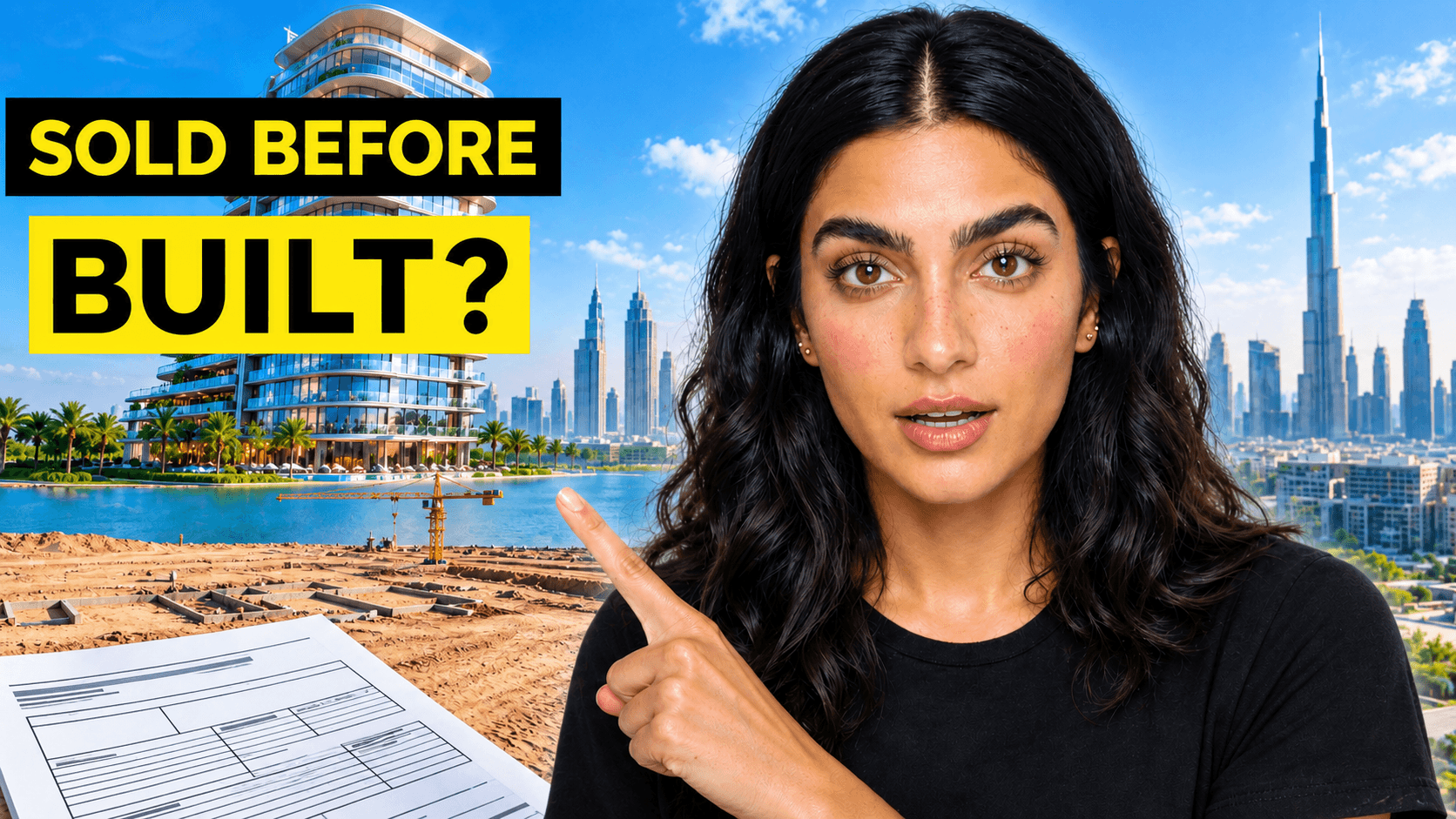


Paste your own channel link or one whose thumbnail style you admire. VidRush studies the visual patterns – color palette, layout, text treatment – and generates thumbnails with the same signature feel, adapted to your video.
Choose from a curated library of templates drawn from high-performing YouTube formats, built around layouts that have already earned clicks at scale.
Select text overlays, color schemes, layout styles, and visual emphasis to create thumbnails that attract clicks and stay consistent with your channel identity.
Generate the thumbnail in the context of the video project so the asset remains tied to the subject it is intended to represent.
Pair the downloadable thumbnail with the finished VidRush video so the core creative assets are prepared together for final review and publishing.
Generate multiple thumbnail options in different styles and compositions. Compare them side by side and pick the version most likely to earn the click, or test them live.
Paste your own channel link or one whose thumbnail style you admire. VidRush studies the visual patterns – color palette, layout, text treatment – and generates thumbnails with the same signature feel, adapted to your video.
Choose from a curated library of templates drawn from high-performing YouTube formats, built around layouts that have already earned clicks at scale.
Select text overlays, color schemes, layout styles, and visual emphasis to create thumbnails that attract clicks and stay consistent with your channel identity.
Why VidRush
Why VidRush
VidRush connects the thumbnail to the complete long-form video workflow rather than making it a separate creative task.
Keep the thumbnail associated with the same topic and project used to create the narration, visuals, captions, music, and final video.
Move from a completed edit to a downloadable thumbnail without restarting the creative process in another tool.
Review whether the generated asset represents the content clearly and matches your channel before publishing it.
Create videos and thumbnails for documentary-style content, educational explainers, listicles, and faceless YouTube formats.
Create multiple variations, reference the visual style of channels you admire, and select from proven templates so you publish a thumbnail you are confident in.
Use cases
Use cases
Generate a thumbnail connected to the central subject or story of a longer, narration-led video.
Prepare a visual entry point for a video that teaches a concept, process, or subject.
Create a thumbnail for ranked, numbered, and curiosity-led long-form formats.
Complete a video package without needing an on-camera creator to produce the thumbnail asset.
How it works
How it works

Give VidRush a topic, brief, outline, or script and generate a structured long-form video draft.

 Scenes
 VisualsThumbnail
Check the thumbnail created alongside the project and confirm it represents the video clearly. You can also generate variations, reference another channel's style, or start from a proven template.

Download the thumbnail and use it with the finished video in your channel publishing workflow.
Give VidRush a topic, brief, outline, or script and generate a structured long-form video draft.
ScenesVisualsThumbnailCheck the thumbnail created alongside the project and confirm it represents the video clearly. You can also generate variations, reference another channel's style, or start from a proven template.
Download the thumbnail and use it with the finished video in your channel publishing workflow.
What is an AI thumbnail generator?
An AI thumbnail generator uses artificial intelligence to create a thumbnail image for a video. VidRush generates the thumbnail alongside the broader long-form video project.
What is an AI thumbnail generator?
Does VidRush generate a thumbnail for my video?
Yes. VidRush can generate a thumbnail alongside the video project so the asset remains connected to the content it represents.
Does VidRush generate a thumbnail for my video?
Can I download the generated thumbnail?
Yes. VidRush provides an option to download the generated thumbnail for use in your publishing workflow.
Can I download the generated thumbnail?
Is the thumbnail generator part of the VidRush video workflow?
Yes. Thumbnail generation is included alongside the workflow used to create the script, narration, scenes, visuals, captions, music, transitions, and final video.
Is the thumbnail generator part of the VidRush video workflow?
Does an AI-generated thumbnail guarantee more clicks?
No. Click performance depends on the content, audience, topic, channel, and how clearly the thumbnail and title communicate the value of the video.
Does an AI-generated thumbnail guarantee more clicks?
Should I review the thumbnail before publishing?
Yes. Confirm that it represents the video accurately, fits your channel, avoids misleading claims, and uses visual elements appropriately.
Should I review the thumbnail before publishing?
What kinds of videos can I create thumbnails for?
VidRush is designed for long-form formats such as documentary-style videos, educational explainers, listicles, and faceless YouTube content.
What kinds of videos can I create thumbnails for?
Does VidRush publish the thumbnail directly to YouTube?
The generated thumbnail can be downloaded from VidRush and then used in your channel publishing workflow.
Does VidRush publish the thumbnail directly to YouTube?
Can VidRush create the video as well as the thumbnail?
Yes. VidRush creates a structured, editable long-form video project and generates a thumbnail alongside it.
Can VidRush create the video as well as the thumbnail?
What format and resolution can I render the video in?
VidRush currently renders videos as MP4 files in 1080p at 30 frames per second.
What format and resolution can I render the video in?
Can I create more than one thumbnail for the same video?
Yes. VidRush lets you generate multiple thumbnail variations for a single video so you can compare options and select the strongest one, or A/B test them to see which performs best.
Can I create more than one thumbnail for the same video?
Can I match the thumbnail style of another YouTube channel?
Yes. Paste the link of your own channel or any channel whose visual style you want to reference. VidRush analyzes the thumbnail patterns – layout, color, text treatment – and generates thumbnails that carry a similar look, adapted to your video.
Can I match the thumbnail style of another YouTube channel?
What is the proven thumbnail library?
The library is a curated collection of thumbnail templates based on high-performing YouTube formats. Each template reflects layout and composition patterns that have already earned clicks at scale.
What is the proven thumbnail library?
Generate your long-form video and thumbnail in one connected VidRush workflow.





The #1 AI tool for producing
long-form videos
© Copyright 2026, All Rights Reserved by Vidrush AI Studios - VIDRUSH AI STUDIOS LLP
Receive product updates, feature releases, and industry insights straight to your inbox.

The #1 AI tool for producing
long-form videos
© Copyright 2026, All Rights Reserved by Vidrush AI Studios - VIDRUSH AI STUDIOS LLP
Receive product updates, feature releases, and industry insights straight to your inbox.
The #1 AI tool for producing
long-form videos
© Copyright 2026, All Rights Reserved by Vidrush AI Studios - VIDRUSH AI STUDIOS LLP
Receive product updates, feature releases, and industry insights straight to your inbox.