Theo Brennan
Editor

Ask a forum how long it takes to edit a YouTube video, and for the same 10 minutes the answers run from 20 minutes to 30 hours. Both ends can be honest, because the people giving them are counting different jobs. To get a figure you can plan uploads around, work in this order:
Find your video's row in the hours table by format and finished length.
Adjust that range for how much raw footage you record, instead of using the hour-per-minute rule.
Check what any benchmark includes before you compare your hours with it.
Time your next edit by stage to find the one eating your hours.
Apply speed-ups to that heavy stage first.
If the hours still don't fit your schedule, hand the build to software such as VidRush for long-form, or hire an editor.
How long does it take to edit a YouTube video?
Find your format in the table. The middle column is mostly one professional editor's 2026 breakdown by format, which is what an experienced editor plans for. The third column is what to expect on your first few videos.
Video | Experienced editor | First videos (estimate) | What the finish includes |
|---|---|---|---|
Simple talking head, 10 min | 2–4 h | 4–6 h | Jump cuts, captions, light B-roll |
Tutorial or screen recording, 10 min | 4–8 h | 6–12 h | Zooms, callouts, screen cleanup |
Vlog, 10 min | 6–12 h | 2–3x | A lot of footage to sort, music, cutaways |
Commentary or essay with B-roll, 10 min | 8–15 h | 2–3x | B-roll on most lines, graphics, sound design |
Documentary-style, 10 min | 10–20+ h | 15–20+ h | Story structure, stock or archival, full sound and colour |
Heavy animation or motion graphics, 10 min | 20–40+ h | 2–3x | Custom animation throughout |
Video podcast, 60–90 min, multicam, light cuts | 4–8 h | 2–3x | Angle switching, audio levelling, cleanup |
Short cut from existing long-form | 20–60 min | 2–3x | Pick the moment, reframe, captions |
Original Short with its own graphics | 1.5–4 h | 2–3x | 30+ cuts, sound effects, kinetic captions |
Editing hours by format and finished length: editors' planning ranges, not timed measurements.
The first-videos column comes from two editors' estimates. Ross at Make Videos with Ross gives beginner ranges for talking heads, tutorials and documentaries. For the other rows, the same Pacinghouse guide says to expect two to three times the experienced figure on early videos. Nobody timed a cohort of beginners to get them.
Pick the row by what's on screen
I'd rather you find yourself by how polished the finished video is than by how many videos you've made, because the finish is what moves the hours. The same 10-minute runtime needs roughly four times the work once B-roll, graphics and sound design come in.
Some beginners in the threads we read called their own edits "simple" and then described sourcing a cutaway for nearly every sentence. If B-roll covers most of your lines, you're in the commentary row whatever your topic is. If it's you talking with the occasional cutaway, you're in the talking-head row, even at 15 minutes.
Ross also shows what the bottom of a row looks like. He edits an 8-minute talking-head tutorial against a hard two-hour timer, using three or four saved scene layouts and keeping the rough cut separate from the B-roll pass. That works out to 15 minutes of editing per finished minute, and it comes from a deliberate cap plus templates, which is a choice you can copy. It isn't evidence that he's unusually talented.
If you recorded an hour
First decide which hour you mean. If the hour is the finished episode of a light-cut multicam podcast, use the podcast row: 4–8 hours for the whole thing. If you shot an hour of raw footage to make a 10-minute video, use the 10-minute row and add the time it takes to watch what you shot.
The "8 minute rule" that turns up in the same searches is a different kind of length number. It concerns ad placement rather than editing time, and it sits with YouTube's monetisation and AI-content policies.
Why the 'hour per finished minute' rule doesn't fit your video
Stop planning around the per-minute ratio. It lands roughly right for a mid-length video with moderate B-roll and badly wrong at both ends of YouTube's length range.
Video | Hour-per-minute rule predicts | Editors' benchmark |
|---|---|---|
Original 60-second Short with its own graphics | 1 h | 1.5–4 h |
10-minute commentary with B-roll | 10 h | 8–15 h |
60-minute multicam podcast, light cuts | 60 h | 4–8 h |
The rule against editors' benchmarks: it under-predicts a dense Short and badly over-predicts a long podcast.
Against editors' benchmarks, the rule comes in about one and a half to four times too low for an original Short and roughly eight to fifteen times too high for a 60-minute podcast. Runtime is the wrong thing to measure, because the work scales with the number of decisions.
A Short with 30 cuts in a minute packs a lot of decisions into very little screen time. A podcast is mostly one continuous conversation where you trim, level the audio and switch angles, at about five minutes of editing per finished minute.
Where the rule came from
The earliest source we could trace is a February 1999 University of Florida extension bulletin, "Producing an Educational Video", written by Ricky Telg for people making educational programmes. It calls the figure "the industry rule of thumb": at least an hour of editing per finished minute, doubling if you add special effects.
The bulletin cites no study and presents the figure as a note already in circulation, so it tells us the rule was around by 1999 and nothing about who started it. It has been copied onto ranking pages ever since, sometimes softened to "30 to 60 minutes per minute".
Adjust for raw footage instead
Raw footage sets the floor. You watch every minute you shot at least once, however short the finished video ends up.
A scripted talking head shoots at about 2:1 to 5:1, so 20–50 raw minutes for 10 finished. Vlogs run 12:1 to 25:1 and documentaries 50:1 to 100:1 or more, by Mark Studios' rules of thumb. On their estimate, a 10-minute vlog cut from three hours of footage needs two to three hours of watching and logging before any cutting starts.
Editors price the same way. Mark Studios points to Replayed, which charges $349 for a 10-minute cut from up to 35 raw minutes and $559 for one from 36–60 raw minutes. The finished length is identical. The price moves with the footage you send, because someone has to watch it.
So count your raw minutes before you trust your row, and compare your raw-to-finished ratio with the typical one for your format. If you're inside that range, the row stands. If you're over it, add viewing time for the excess footage. For example, 60 raw minutes for a 10-minute talking head, which usually runs on 20 to 50, means about 10 to 40 extra minutes of watching before any cutting starts.
Three years of cutting long history videos taught me that the long ones were rarely the slow ones. The slow weeks were the ones where far too much footage came in.
Is your editing time normal? Check what the figure includes first
You're probably not slow. More often, you're comparing yourself with a figure that measures a different job.
What 15 Reddit reports showed
Note: How we researched this: we went through 15 Reddit posts and replies from creator and editor subreddits where someone gave the hours they spend editing a 5–20 minute YouTube video, and asked the same 12 questions of each one.
We expected two clusters: experienced creators at about 2–6 hours for a 10-minute video, and beginners at two and a half times that or more. They weren't there. Across the 15 reports, the hours ran from 0.33 to 25 for videos with a median finished length of 10 minutes. The five beginners had a median of 6 hours, the eight whose experience we couldn't tell had 7.5, and the two professional editors had the highest median of the three groups, at 17.5.
Treat this as a small, self-reported sample and nothing more. It has only two professionals, both broadcast or film editors who were new to YouTube clients. More than half the posters didn't say how experienced they were, and we couldn't identify a single experienced creator editing their own channel.
What it does show is what pushed the figures apart. In this sample, what each person counted as editing explained the spread better than experience did. Both professionals counted the whole finishing job, from colour and the audio mix to picking music and sound effects, graphics and sourcing stock. One broadcast editor on r/editors works at 1–2 hours per finished minute and budgets 20–30 hours for a 15-minute edutainment video.
That matches what I saw in edit bays. When I was cutting ads, "the edit" meant everything up to a mastered file, while most creators mean "until it looks fine on my laptop". A hired editor's hour and a creator's hour are different units, so falling short of a professional's figure doesn't mean you're behind.
The low end of the sample fits the same pattern. One creator on r/SmallYTChannel reported about 20 minutes of editing for a 10–20 minute video, and counted recording and voiceover separately.
Run this check before you compare
Does it include finding B-roll, stock, music or images? Sourcing is the stage most often missing from low figures.
Does it include graphics, voiceover re-records or screen blurring? Some creators fold these into editing and some don't.
Does it include colour and an audio mix? A full finish adds hours after the cut is locked.
Does it include thumbnails, titles and the upload? These are separate jobs that often get lumped in.
Is the finish level the same as yours? Compare a talking head with a talking head, not with a B-roll essay.
Packaging is the item people forget most. One production workflow guide budgets 1–2 hours for the title and a few thumbnail options, plus 20–40 minutes for the description, chapters and upload settings. If your "six hours of editing" includes all of that, your timeline time is closer to four.
If you're hiring: days and hours are different numbers
The same check applies to an editor's quote. When an editor or editing service gives you a timeframe, it's usually turnaround, meaning calendar days from sending footage to getting a draft. Komet Media's guide to turnaround puts that at 3–7 business days for a 10–15 minute draft, against 6–20 hours of hands-on editing. The rest is the queue and file transfer.
Each revision round typically adds 24–48 hours. If you upload weekly, send footage at least a week ahead of publish day.
Where the editing hours go, stage by stage
The hours pool in different places depending on the video. In an edit that's mostly talking, they collect in the rough cut and the fine cut. Once B-roll runs through the whole video, B-roll and graphics become the biggest single block.
What editors allow for each stage of a 10-minute edit
Stage | Mostly talking | B-roll on most lines |
|---|---|---|
Ingest, organising, reviewing | 30–60 min | 30–90 min |
Assembly and rough cut | 3–6 h | 1–3 h |
Fine cut and pacing | 2–4 h, B-roll included | 1–2 h |
B-roll and graphics | Counted in fine cut; titles 1–2 h | 2–6 h |
Sound | 1–2 h | 1–2 h |
Colour | 1–2 h | 30 min–2 h |
Captions, review, export | Export only: 15–60 min | 1–2 h |
Total the source gives | About 6–14 h | 8–15 h |
Planning allowances for a 10-minute video, not timed measurements. Talking column from Loopdesk's editing-process guide, which assumes a full finish with colour, titles and a mix, so it runs well above the simple talking-head row earlier. B-roll column from one professional editor's breakdown. Totals are each source's own; no edit hits the top of every stage at once.
The talking column comes from Loopdesk's guide to the editing process. The B-roll column is the Pacinghouse editor's own split for a 10-minute video with graphics. Both are allowances people plan with. We tried to collect real stage-by-stage timings and couldn't get a usable set, so nobody on this page has measured what share of an edit each stage takes.
Use the allowances to guess your heavy stage, then time your own edit to confirm it. Next edit, write down the clock time whenever you switch stage: importing, cutting, B-roll, sound, colour, captions, export. One rough sheet tells you more about your own week than any benchmark.
Count from the moment you import to the moment the master renders. Scripting, recording, voiceover re-records and thumbnails go on separate lines, or you can't compare your figure with anyone's or tell which stage to fix. The stages are the same in Premiere Pro, DaVinci Resolve, Final Cut Pro, CapCut and iMovie, which is where most YouTubers do this work.
Why B-roll eats the time
Searching takes longer than placing. Stock libraries match the literal words you type, while a script line is usually an idea, so you type "inflation" and get a man holding a calculator. One creator asking how experienced editors gather stock footage wrote that "finding footage that actually fits the narrative takes me hours", even for a one-minute section.
That's one person's account, though it matches mine. When I ran the aviation channel, I spent more nights sourcing archival than writing. Faceless channels get hit hardest, because sourcing sits on top of scripting and voiceover, which is why a faceless video takes 10+ hours end to end.
Every cutaway also brings a sound job. A still placed plainly on the timeline is a few minutes of work. Animate it, time a whoosh to the motion and sit that whoosh about 6 dB under the voice, and the same still takes several times as long.
Plan B-roll on every line and you're planning two tracks of work per line, which goes a long way to explaining why the commentary row runs about four times the talking-head row. Not every line needs it. I'd rather see fewer cutaways that each earn their whoosh than one on every sentence, because after a minute of constant cutaways the viewer stops registering them.
How to edit YouTube videos faster
Go after the heavy stage on your timing sheet first. General speed tips spread effort across stages that weren't costing you much to begin with.
If cutting is the heavy stage, most of the rework comes from polishing too early. Justin Brown at Primal Video lays out an order that prevents it. The video is from 2018, and the method still holds:
Make one rough-cut pass using J/K/L to speed playback and Q/W to ripple-trim, and strip everything unusable.
Duplicate the rough timeline so you can always roll back.
Add music, level the voice and lay in B-roll.
Add text, lower thirds and titles.
Do colour and audio mastering only at picture lock.
Leaving grades and effects until the end does two things. Playback stays smooth while you're making structural decisions, and you never colour a clip you later cut.
Fix it at the shoot
The cheapest B-roll is the kind you never have to find. Film Booth delivers two or three lines, then turns the camera to a new backdrop, cycling through four at one location and keeping the eye line level across them. The visual change happens in camera, so the edit comes down to head and tail trims.

Film Booth says this took one video from weeks of editing to 20 minutes. That's their claim about one video, so don't plan on it being typical. The principle carries over: each angle change you shoot is a cutaway you don't have to source. If your sheet says B-roll, this is the change I'd make before any other, because it costs nothing but planning and it removes the search for those lines.
The rough cut gets cheaper with recording habits from the same Primal Video breakdown:
Make the last take the keeper: repeat a line until you nail it, then go to the next one.
Clap after a mistake, so the error shows as a spike in the waveform.
Edit backwards from the end, so you find the keeper first and trim the flawed takes without watching them.
Stop rolling between thoughts, so you have less raw footage to review.
Is editing on an iPhone quicker?
Yes for a single-track vertical clip, no for long-form. A comparison of CapCut on phone and laptop finds the phone fastest for 60-second Shorts, because you skip file transfers, and much slower once a project has several layers, keyframes and audio timing to manage.
My read is that the six-inch screen is the limit, more than the chip. Layers, keyframes and audio timing are all things you manage by looking at a timeline, and a phone shows you very little of it. Anything past one A-roll track and one B-roll track gets fiddly on a screen that size.
Can software edit the video for you? What each tool leaves you to do
Yes, one stage at a time. Choose by the line at the top of your timing sheet, because each tool takes over one part of the job and leaves the rest with you.
Which tool takes which stage
Tool | Stage it takes over | What you still do | Fits | Entry price |
|---|---|---|---|---|
VidRush | The whole long-form build: cuts, B-roll, captions, music, mix, thumbnail | Review and swap clips; grade elsewhere if needed (MP4 only) | Long-form talking head, explainer, documentary | $99/month Starter, no free tier |
Gling | Silences, filler and retakes in spoken audio | B-roll, music, graphics; exports a timeline to your editor | Talking-head rough cuts | Free tier with 1 h/month; Plus $10/month billed annually |
Descript | Transcript-based cutting of dialogue | B-roll, music, graphics | Edits that are mostly talking | Creator $24/month billed annually |
AutoPod | Multicam angle switching inside Premiere Pro | Everything else in Premiere | Multi-camera podcasts and interviews | $29/month per machine, 30-day trial |
InVideo AI | A stock draft built from text | Swapping clips; it can't take raw talking-head footage | Script-only videos | Plus $60/month ($30 billed annually) |
Pictory | A stock draft built from text | Swapping clips; it can't take raw talking-head footage | Script-only videos | Starter $29/month ($25 billed annually) |
What each tool takes off your desk, and what it leaves on it. Prices from each vendor's own pricing page.
If cutting talk tops your sheet, VidRush's talking-head route removes the pauses and filler as part of a finished edit, with captions and B-roll already placed. If you only want a trimmed timeline to finish in your own editor, the rough-cut cleaners (Gling's plans, Descript's plans) are the cheap way to get one. The one beginner in our sample who mentioned transcript-based trimming, in CapCut, came in at 5–6 hours for a 10-minute video, among the faster figures.
That's one person, but it fits what I'd expect: software helps a beginner most at the cutting stage. A rough-cut tool does nothing for the B-roll stage, which is where the bigger rows in the hours table get their size.
When the B-roll build is your heavy stage
I work at VidRush, and this is the job it was built for. Once a rough-cut tool has trimmed your talking, the B-roll, captions, music and mix still take the hours in the stage table. In VidRush you upload your single-speaker English talking-head recording (6 minutes to 2 hours, MP4, MOV or WebM), or a script, or a voiceover, and confirm the format, voice and duration on the plan screen before any credits are spent.
What comes back, typically within about an hour, is a finished 1080p widescreen MP4. The pauses and filler are cut, which leaves the video at roughly 90% of your recording's length, and licensed Storyblocks B-roll, captions, music, a mix and a thumbnail are already in place. At peak times rendering can stretch to several hours, so don't start one the night before publish day.
Script-to-video tools start from text only. VidRush also takes your raw on-camera recording and cuts it, and VidRush for talking-head videos shows that route and the format checks.

What you still do: the review pass
Your time moves from building the edit to reviewing it. Watch the draft through, and when a clip reads too literally (stock still matches words, even when a machine is choosing it), replace it from the media library in the review editor or with Rush Agent. Rush Agent is a chat panel, in early beta, where you ask for a better alternative to a selected clip. It works best on stretches of around 30 seconds.
Then fix any misheard names in the captions, check the music level and re-render, which costs about 10% of the original credits.
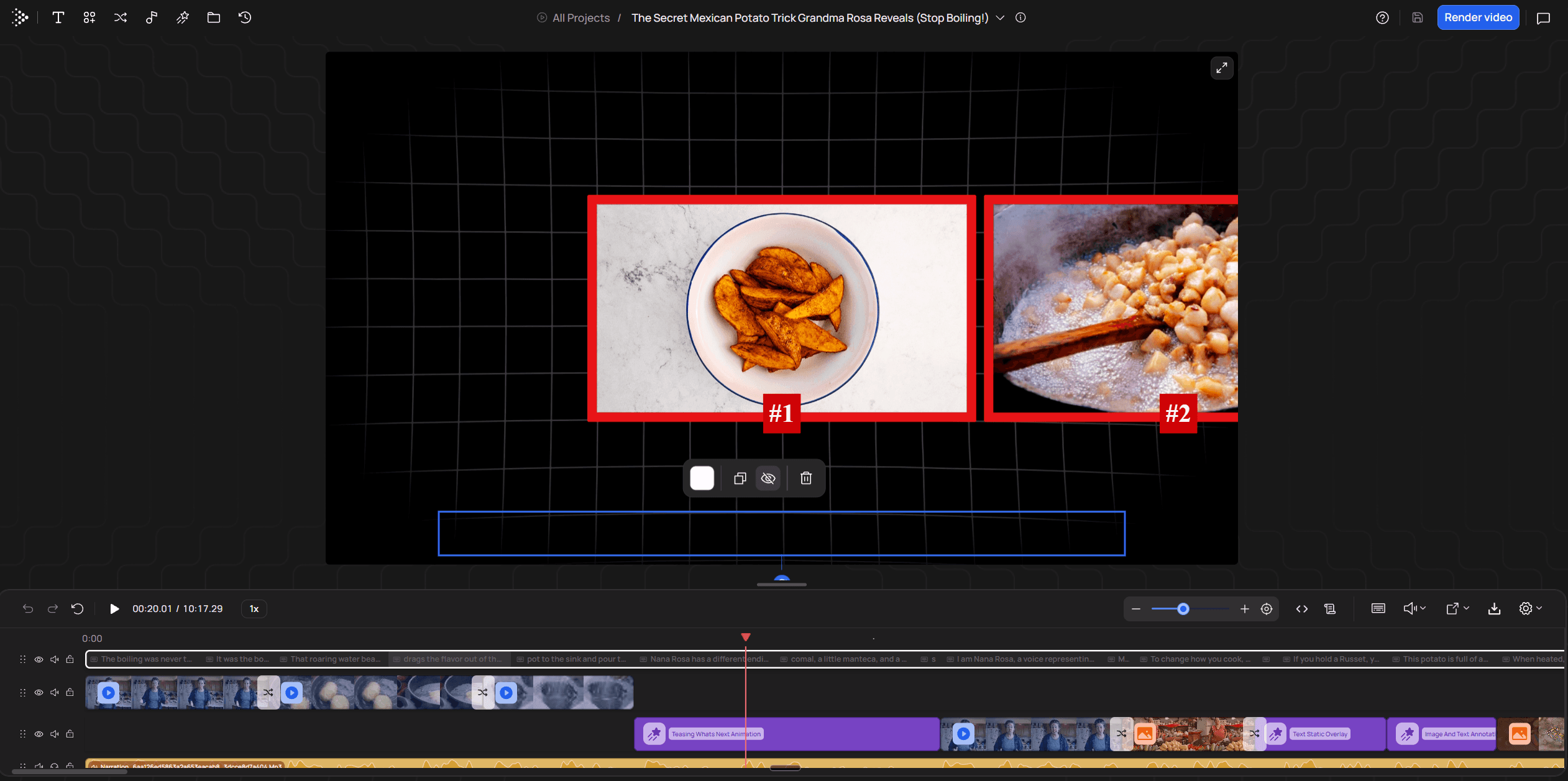
The export is a flattened MP4 with no project timeline, so if you grade or master, you do it afterwards in Premiere Pro or Resolve. VidRush is built for long-form talking-head, explainer and documentary videos. For Shorts, screen tutorials and multi-camera podcasts, the stage tools in the table fit better, and topics with very little footage online come back with thin visuals.
Starter is $99 a month, or $79.20 a month billed annually, for 2,000 credits, which covers about four 10-minute videos. Creator is $239 a month. There's no free tier and no trial, and VidRush plans and credits has the full breakdown.
Weigh that against what you pay now. Four commentary-row edits a month is four lots of 8–15 hours of your evenings. Four freelancer invoices run $40–$125 each from marketplace freelancers and $300–$500 each from established US freelancers, by Mark Studios' rate survey.
Do the arithmetic before you buy anything
Take your row's hours, multiply by your weekly uploads, and set that against the evenings you really have. Plan from a bad week. Mark Studios' guide to a sustainable upload schedule suggests taking 20% off your available hours for friction and setting the schedule by a bad week rather than a good one. I'd follow that, because the week a render fails or a client call runs long is the week a schedule built on good weeks collapses. If the number still fits, nothing needs buying. If it doesn't, the stage at the top of your sheet tells you where the help goes.
Keep editing yourself if your hours times uploads fits with room to spare, and fix the heavy stage with the habits above.
Use VidRush if you make long-form talking-head, explainer or documentary videos and want the edit back finished, whether cutting talk or the B-roll build tops your sheet.
Use a rough-cut tool if you only want a trimmed talking-head timeline to finish in your own editor.
Hire an editor if you want a person's judgement on the cut, and judge the quote on hands-on hours rather than turnaround days.
For the common case on this page, a self-edited long-form video with B-roll on most lines, I'd try software on the build before hiring. A month of Starter costs less than a single video from an established freelancer, and one built draft of your own recording tells you whether the review pass fits your week. I'd hire when what you're missing is judgement on the cut rather than hours.
If you want rankings rather than stages, AI video editors compared by the video you make covers that ground. Otherwise, time your next edit, find the top line on the sheet, and pick the option that removes it.
Frequently asked questions
If I recorded an hour, how long will the edit take?
If the hour is the finished video, such as a light-cut multicam podcast, editors plan 4–8 hours. If you shot an hour to make a 10-minute video, use your 10-minute row and add at least one full viewing of the raw hour on top, because every minute you shot has to be watched once.
How long does a 60-second Short take to edit?
A Short cut from footage you already have takes 20–60 minutes. An original Short with its own graphics, 30 or more cuts and kinetic captions takes 1.5–4 hours, which is far more than its runtime suggests.
Is it normal to take 10 hours to edit a 10-minute video?
Yes, if it has B-roll on most lines, graphics and sound design. Editors plan 8–15 hours for that. For a plain talking head, 10 hours is high, and your timing sheet will show which stage is swelling.
How long does a hired editor take to deliver a video?
Typically 3–7 business days for a first draft of a 10–15 minute video, with 24–48 hours added per revision round. The hands-on editing inside that window is 6–20 hours, so plan your upload date around the days, not the hours.